
Technical SEO Guide (How to Improve Your Website’s Technical SEO)

You've built your website, published your content, and started working on your online presence. But there's another important piece of the puzzle that often gets overlooked: what's happening behind the scenes?
Your website might look great to visitors, but that doesn't automatically mean search engines can access, understand, and index it properly.
This is where technical SEO comes in.
A strong technical SEO guide helps you understand the behind-the-scenes elements that support your website's visibility in search engines. It covers everything from website structure and page speed to mobile optimization, indexing, XML sitemaps, and structured data.
But what is technical SEO and why is it important for your business?

Simply put, technical SEO focuses on improving the technical foundation of your website so search engines can discover, crawl, and understand your pages. It also helps create a better experience for visitors by making your website accessible, functional, and easier to navigate.
You don't need to be a developer to understand the fundamentals. And you certainly don't need to rebuild your entire website to start making improvements.
In this guide, we'll break down the essential technical SEO concepts, explain how common website issues affect search visibility, and show you practical steps you can take to improve your website.
We'll also explore what is a technical SEO specification and how documenting your website's technical requirements can help keep future updates, redesigns, and optimization projects on track.
Whether you're building your first business website or improving an established online presence, this guide will give you a practical starting point.
You'll also find a technical SEO checklist to help you identify potential issues, prioritize improvements, and maintain a healthier website over time.
If you're new to search engine optimization altogether, start with our Beginner's Guide to SEO to understand how SEO works and how technical optimization fits into your broader marketing strategy.
And if you're looking at the bigger picture of growing your business online, download our free e-book, How to Build Your Business's Online Presence in 90 Days. It walks you through the steps to establish a stronger online foundation and build a digital presence that supports long-term growth.
Let's get started.
Table of Content

What Is Technical SEO?
Imagine building a beautiful business website, filling it with helpful content, and offering exactly what your customers are searching for, only to discover that Google cannot properly find or understand it.
That's where technical SEO comes in.
Technical SEO focuses on improving the behind-the-scenes elements of your website so search engines can discover, crawl, understand, index, and display your pages in search results. It also helps create a better experience for visitors by improving website speed, mobile usability, security, and overall functionality.
In this technical SEO guide, we'll break down how technical SEO works, why it matters, and how it fits into a broader search engine optimization strategy.
You don't need to be a developer to understand the fundamentals, but knowing what happens behind the scenes can make a significant difference to your website's visibility.
Technical SEO Explained in Simple Terms
So, what is technical SEO?
Think of your website as a physical business.
Your homepage is the storefront, your service pages are the departments, and your content helps customers understand what you offer.
But before anyone can enjoy the experience, the building needs to be accessible, the doors need to open, the signs need to make sense, and everything needs to work properly.
Technical SEO is the digital equivalent of making sure the building is functional.
It helps search engines access your website, navigate its structure, understand which pages matter, and determine whether those pages should appear in search results.
Without a solid technical foundation, even excellent content can struggle to perform.
What Is a Technical SEO Audit?
A technical SEO audit is a structured examination of your website's technical health.
Its purpose is to identify issues that could prevent search engines from accessing, understanding, or indexing your content, as well as problems that negatively affect the user experience.
Think of it as a website health check. Instead of checking your blood pressure, we're checking broken links, indexing problems, site structure, redirects, mobile usability, and other technical factors.
The purpose of an audit isn't simply to produce a long list of technical errors. It's to identify which issues matter, prioritize them based on their potential impact, and create a practical plan to resolve them.
A website with a minor image optimization issue doesn't necessarily need the same level of attention as one with its entire service section accidentally blocked from indexing.

How Does Technical SEO Work?
To understand how does technical SEO work, it's important to understand how search engines discover and process website content.
Google generally follows three fundamental stages when processing web pages: crawling, indexing, and ranking.
These stages work together, but they serve different purposes. A page must first be discovered and accessed before Google can properly evaluate it for inclusion in its search index. Once indexed, it may become eligible to appear in relevant search results.
Let's break down each stage.
Crawling
Crawling is the process search engines use to discover pages and explore the content available on the internet.
Google uses automated programs called crawlers, with Googlebot being its primary web crawler, to visit websites, follow links, and discover new or updated pages.
Think of Googlebot as a visitor exploring your website with a map. It starts somewhere, follows the paths available, and discovers additional pages along the way.
If your homepage links to your services page, and your services page links to your website design page, Google can follow those internal links to discover the content.
However, if your e-commerce page has no internal links pointing to it, it may be more difficult for search engines to discover.
This is why website navigation and internal linking are important parts of technical SEO.
Indexing
Once Google discovers a page, it may attempt to process and store information about that page in its search index.
This process is called indexing.
The Google index is essentially a massive database of web pages and information that Google has discovered and processed. When someone performs a search, Google uses this index to identify pages that may be relevant to the query.
However, discovering a page does not automatically mean Google will index it.
Google evaluates several factors when deciding whether a page should be included in its index. These can include the page's content, technical accessibility, canonicalization signals, and whether the page provides sufficient value to users.
Google may decide that the duplicate page doesn't provide enough unique value to warrant separate indexing.
This is why creating useful, original content and maintaining a clean website structure are important.
One of the easiest ways is to use Google Search Console.
The URL Inspection tool allows you to examine individual URLs and see whether Google has indexed them, when they were last crawled, and whether any indexing issues have been identified.
Ranking
Once a page has been crawled and indexed, it may become eligible to appear in search results.
Ranking is the process of determining which pages are most relevant and useful for a particular search query.
Google considers many signals when generating search results, including the relevance and quality of content, the context of the search, usability, and other factors.
Technical SEO helps ensure your website is accessible, understandable, secure, and capable of delivering a positive experience. However, having a technically sound website does not guarantee high rankings.
A website can have excellent technical foundations and still struggle to rank if its content doesn't satisfy search intent, its pages aren't relevant to the target audience, or competing websites provide more useful information.
This is why technical SEO needs to work alongside content optimization, website authority, and a broader search strategy.
For a deeper look at the signals that influence search visibility, read our guide to Top Google Ranking Factors.
Crawling, indexing, and ranking are connected, but they aren't interchangeable.
Crawling helps Google discover and access your pages. Indexing determines whether those pages are stored and eligible to appear in search results. Ranking determines where eligible pages may appear for relevant searches.
Your technical SEO strategy should support all three stages.

Why Is Technical SEO Important?
Understanding what is technical SEO and why it matters is essential for any business that wants to generate consistent organic traffic.
Your website is often one of your most important digital business assets. It introduces your company, explains your services, builds credibility, and helps turn potential customers into paying clients.
But your website cannot generate much organic search traffic if search engines struggle to access or understand it.
Technical SEO creates the foundation that allows your content and other SEO efforts to perform as intended.
Here are some of the biggest reasons why is technical SEO important for growing businesses.
It Helps Search Engines Discover Your Content
Your website might contain dozens of valuable service pages, blog articles, and resources. However, if those pages are difficult to crawl or poorly connected through internal links, search engines may struggle to discover them.
A logical website structure, accessible pages, and properly configured XML sitemap help search engines find important content.
This is especially important as your business grows and your website expands with additional services, locations, and educational resources.
It Helps Prevent Indexing Problems
Publishing a page doesn't guarantee that Google will include it in search results.
Technical issues such as accidental noindex directives, incorrect canonical tags, duplicate URLs, and crawl restrictions can prevent important pages from being indexed correctly.
Regularly monitoring your website helps identify these problems before they affect important sections of your online presence.
It Improves Website Performance and User Experience
Website performance affects how visitors experience your business.
If a page takes too long to load, buttons don't work, or the layout becomes difficult to navigate on a smartphone, visitors may leave before taking action.
Google also uses page experience signals, including Core Web Vitals, as part of its broader ranking systems.
These metrics help identify performance problems that can frustrate visitors.
For example, a potential customer visiting your website on their phone shouldn't have to wait several seconds for your services to appear or accidentally click the wrong button because the page layout keeps shifting.
A faster, more stable website creates a smoother experience and makes it easier for customers to explore your business.
It Helps Your Website Scale as Your Business Grows
A small business website might start with five pages. A few years later, it could have 50 service pages, 100 blog articles, multiple locations, and an extensive resource library.
Without a scalable technical foundation, managing that growth can become increasingly complicated.
Duplicate URLs, outdated redirects, inconsistent page structures, and unnecessary indexable pages can create problems as your website expands.
Planning your website architecture and technical SEO early helps prevent these issues from becoming much harder to resolve later.
Ultimately, what is technical SEO and why is it important comes down to this: it ensures the technical foundation of your website supports the visibility, performance, and growth your business is working toward.
You can publish the best content in your industry, but your website still needs to function properly behind the scenes.

Technical SEO vs. On-Page SEO vs. Off-Page SEO
Technical SEO is only one part of a complete search engine optimization strategy.
To understand where it fits, it's helpful to compare it with on-page SEO and off-page SEO.
All three work toward improving your website's visibility in search engines, but each focuses on a different area.
Technical SEO vs. On-Page SEO
The biggest difference between technical SEO and on-page SEO is what each focuses on.
Technical SEO focuses on the infrastructure that allows search engines to access, process, and understand your website.
On-page SEO focuses on optimizing the content and individual elements of your pages so they align with what your target audience is searching for.
Your technical SEO work might involve ensuring the page loads quickly, works on mobile devices, can be crawled and indexed, and has a clear URL structure.
Your on-page SEO work would involve writing a relevant title tag, creating a descriptive H1 heading, explaining your website design services, incorporating relevant keywords naturally, and including helpful internal links.
Both are necessary.
A technically perfect page with little useful content may struggle to satisfy search intent. Likewise, an excellent service page may have limited search visibility if technical issues prevent Google from indexing it.
If you want to learn how to optimize the content and structure of individual pages, explore our Beginner's Guide to On-Page SEO Optimization.
Technical SEO vs. Off-Page SEO
Technical SEO and off-page SEO focus on two different sides of your website's search presence.
Technical SEO focuses on what happens within your website's infrastructure.
Off-page SEO focuses on activities and signals outside your website that can help build your brand's reputation, credibility, and authority.
One of the most recognized elements of off-page SEO is backlink building.
A backlink is a link from another website pointing to yours. When relevant and trustworthy websites link to your content, those links can help search engines understand your website's reputation and relationships within a particular industry.
However, not all backlinks are equal. A large number of irrelevant or manipulative links won't automatically improve your rankings and can create additional risks.
Technical SEO, meanwhile, ensures that the website receiving those visitors and authority signals is accessible, properly structured, and functioning as intended.
Your business earns a valuable backlink from a respected industry publication. That link sends visitors to your website and may contribute to your site's authority. But if the destination page returns an error or redirects visitors to an unrelated page, you're wasting an opportunity.
This is why off-page SEO and technical SEO should complement one another.
Think of SEO like building a successful business.
Technical SEO makes sure the building works. On-page SEO makes sure everything inside is organized, useful, and easy to understand. Off-page SEO helps build your reputation outside the building.
You need all three working together.

What Does Technical SEO Include?
Technical SEO involves much more than making your website load quickly or fixing a few broken links.
It covers the technical elements that help search engines access your website, understand how its pages are connected, and process the information they find.
So, what is included in technical SEO?
A comprehensive technical SEO strategy considers your website's architecture, URL structure, internal linking, XML sitemaps, mobile usability, structured data, crawl directives, and overall technical performance.
Each element serves a different purpose, but they all contribute to the same goal: creating a website that is easy for search engines to process and easy for customers to use.
For small businesses, getting these fundamentals right can make a significant difference as your website grows.
You don't need an overly complicated website with dozens of technical integrations. You need a clear, organized, accessible foundation that supports your business goals.
Let's look at the essential technical SEO elements every business website should understand.

Website Structure & Architecture
Your website structure determines how your pages are organized and how visitors and search engines navigate between them.
A well-organized website makes it easier for customers to find information, understand your services, and take the next step. It also helps search engines discover important pages and understand the relationships between different sections of your website.
Imagine visiting a restaurant where the menu, washrooms, and exit signs are scattered randomly throughout the building. You'd probably find what you're looking for eventually, but the experience wouldn't exactly be impressive.
Your website shouldn't feel like that.
A logical structure creates a predictable path through your content, helping visitors find what they need without unnecessary clicks.
What Is Website Architecture in SEO?
Website architecture in SEO refers to how your website's pages are structured, categorized, and connected through navigation and internal links.
It establishes a hierarchy between your homepage, main service pages, sub-service pages, blog articles, and other resources.
It also helps search engines understand which pages represent your primary services and which pages provide more specific information.
One important concept in website architecture is crawl depth. This refers to how many clicks are required to reach a page from another starting point, often the homepage.
Important pages should generally be accessible through a small number of meaningful navigation steps. If a valuable service page is buried five or six clicks deep with no internal links pointing to it, visitors and search engines may have a harder time discovering it.
There isn't one universally correct number of clicks for every website. The goal is to make important content easy to find through a logical, accessible structure.
How to Create an SEO-Friendly Website Structure
Creating an SEO-friendly website structure starts with understanding your business, your services, and what your customers are searching for.
Instead of adding pages whenever a new idea comes along, plan how your content should fit together.
Start With Your Main Website Categories
Identify the primary sections your website needs. For most small businesses, this includes a homepage, service pages, an about page, contact page, and supporting content.
A larger business might also need industry-specific pages, service-area pages, product categories, resources, and dedicated landing pages.
The objective is to create a structure that reflects how customers think about your business.
Group Related Pages Together
Organize pages into logical categories based on their topics and purpose.
A plumbing company could group its services under a main plumbing services section, with individual pages for drain cleaning, water heater installation, emergency plumbing, and leak detection.
This makes the website easier to navigate and creates opportunities to link related services together.
Use Descriptive Navigation Labels
Your navigation should clearly explain where each link leads.
Labels such as "Services," "About," "Resources," and "Contact" are generally easier to understand than creative labels that leave visitors guessing.
You can still have a personality-driven brand without making people solve a puzzle to find your services.
Build Supporting Content Around Important Topics
Your main service pages can be supported by relevant blog articles, guides, FAQs, and educational resources.
For example, a website design service page might link to articles about responsive web design, website costs, essential website pages, and the differences between web design and web development.
These supporting resources provide additional information while creating meaningful internal links back to your primary service pages.

URL Structure
A URL is the web address used to access a specific page on your website.
A clean URL structure helps visitors understand what a page is about before clicking it. It also provides search engines with another contextual signal about the page's topic and location within your website.
While URLs alone aren't a major ranking shortcut, organizing them properly is an important part of your technical SEO basics.
An effective URL should be descriptive, readable, consistent, and relevant to the content it represents.
How to Create SEO-Friendly URLs
Start by keeping URLs short and descriptive. Include the primary topic when it naturally fits, rather than forcing multiple keywords into the address.
Use hyphens to separate words, as they make URLs easier for people and search engines to interpret.
You should also use lowercase letters consistently and avoid unnecessary words, numbers, special characters, and complicated URL parameters wherever possible.
Your URLs should reflect your website's structure when appropriate. This creates a logical relationship between related pages.
However, your URL structure doesn't need to reproduce every level of your navigation. Simplicity and consistency are more important than creating unnecessarily deep URLs.
Be Careful When Changing Existing URLs
One of the most common technical SEO mistakes is changing URLs without properly managing the old addresses.
If you rename a page, change its URL, or restructure your website, the original URL may still have backlinks, search visibility, and visitors arriving from other websites.
When a page has permanently moved, use an appropriate 301 redirect to send visitors and search engines to the new destination.
Update internal links and your XML sitemap to reference the new URL as well.
Avoid redirect chains, unnecessary redirects, and sending every removed page to your homepage. Redirects should lead to the most relevant replacement whenever one exists.
If you're redesigning an established website, URL planning should happen before launch, not after Google starts discovering hundreds of broken links.

Internal Links
Internal links are hyperlinks that connect one page of your website to another page on the same domain.
They help visitors discover related information, navigate your website, and move between different stages of their buying journey.
For search engines, internal links provide pathways for discovering pages and understanding how your content is connected.
This makes internal linking an important part of technical SEO for beginners, especially as your website grows.
For example, a blog post about website costs could link to your website design service page. That service page could then link to a portfolio, a website redesign article, and a contact page.
A visitor researching website costs might eventually become a customer because your internal links helped them find the information they needed.
That's a much better experience than making someone return to Google every time they want to learn something else.
How Internal Linking Supports Technical SEO
Internal links help search engines discover pages that might otherwise be difficult to find.
They also provide context through the surrounding content and anchor text, the clickable words used to link to another page.
For example, linking to a page using the anchor text "technical SEO services" provides more context than using a generic phrase such as "click here."
Descriptive anchor text helps visitors understand what they'll find after clicking.
Internal links can also help distribute link equity across your website. When a page receives external backlinks, relevant internal links can help search engines discover and evaluate other connected pages.
However, internal links should always be useful and relevant. Adding dozens of unrelated links to every page doesn't create a better SEO strategy.

XML Sitemaps
An XML sitemap is a file that helps search engines discover important pages on your website.
It provides information about the URLs you want search engines to know about, making it easier for crawlers to discover content, particularly on larger websites or websites with complex structures.
Think of an XML sitemap as a directory of your website's important pages.
It doesn't guarantee that Google will crawl or index every URL included, but it gives search engines useful information about the content available.
What Is an XML Sitemap?
An XML sitemap is a structured file written in Extensible Markup Language (XML).
It typically contains a list of URLs, along with optional information such as when a page was last modified.
For most small business websites, an automatically generated XML sitemap is sufficient.
You generally don't need to manually write one unless your website has a specialized setup or requires more control over sitemap generation.
How to Create an XML Sitemap
The easiest way to create an XML sitemap depends on your website platform.
Many modern content management systems and SEO plugins automatically generate and maintain sitemaps as you publish, update, or remove pages.
WordPress includes native XML sitemap functionality, which is generally available at: yourdomain.com/wp-sitemap.xml
If you're using an SEO plugin, check its sitemap settings to ensure your important pages, posts, and other content types are included.
Wix, Shopify, and other popular website builders automatically generates an XML sitemap for your website and updates it as your site content changes.
Regardless of the platform, the next step is to review your sitemap and submit it through Google Search Console.
How to Submit Your Sitemap to Google Search Console
Once your sitemap is available, follow these steps:
Open Google Search Console and select your website property.
Navigate to the Sitemaps section.
Enter your sitemap URL, such as sitemap.xml.
Submit the sitemap.
Review the submission status and investigate any reported errors.
Google can discover sitemaps through other methods, but submitting one through Search Console makes it easier to monitor processing and identify potential issues.

Mobile SEO and Mobile-First Indexing
Your website might look fantastic on a desktop computer, but what happens when someone visits it from their smartphone?
If the text is difficult to read, buttons are too small, navigation is confusing, or important content disappears, you're creating unnecessary barriers for potential customers.
Mobile SEO focuses on making your website accessible, functional, and easy to use on mobile devices while ensuring search engines can properly access and understand its mobile content.
This is particularly important for local businesses. Someone searching for a restaurant, contractor, dentist, or marketing agency might be looking for a service while they're already out and about.
Your website needs to work where your customers are.
What Is Mobile-First Indexing?
Mobile-first indexing means Google primarily uses the mobile version of a website's content for indexing and ranking.
In the past, Google primarily evaluated the desktop version of websites. However, as mobile browsing became increasingly common, Google transitioned toward using mobile versions as its primary source of content.
This doesn't mean Google only indexes websites that are designed exclusively for smartphones.
It means that the mobile version of your website needs to contain the important information Google should be able to discover and evaluate.
But your mobile version hides several of these elements to create a simpler layout.
You could unintentionally create differences between the content Google sees on mobile and the content visitors see on desktop.
A responsive website should adapt its layout to different screen sizes while maintaining access to the important content and functionality.
Why Mobile Optimization Matters for Technical SEO
Mobile optimization matters because it affects both accessibility and user experience.
A technically sound mobile website makes it easier for visitors to navigate, read content, complete forms, browse products, and contact your business.
It also supports Google's mobile-first indexing approach.
Responsive web design allows your website to adjust automatically based on the visitor's screen size.
Instead of maintaining separate desktop and mobile websites, a responsive layout adapts the same website to different devices.
This makes your website easier to maintain and helps ensure that visitors receive a consistent experience.
Make Content Easy to Read
Text should be readable without requiring visitors to zoom in.
Headings should be clearly separated, paragraphs should be easy to scan, and important information shouldn't be hidden behind unnecessarily complicated layouts.
Make Buttons and Navigation Easy to Use
Visitors should be able to interact with your website using their fingers without accidentally selecting the wrong links or buttons.
Keep important actions such as calling, booking, purchasing, and submitting forms easy to access.
Optimize Images and Page Performance
Large images, unnecessary scripts, and poorly optimized website assets can affect loading performance.
Compress images appropriately, use modern image formats where supported, and avoid loading unnecessary resources.

Structured Data & Schema Markups
Search engines don't interpret websites in exactly the same way humans do.
Visitors can look at a page and quickly understand that they're reading a business description, viewing a product, or checking an upcoming event. Search engines rely on structured information and other signals to interpret the content.
This is where structured data and schema markup come in.
They help provide additional context about the information on your website, making it easier for search engines to understand what your pages represent.
What Is Structured Data?
Structured data is information organized in a standardized format that helps machines interpret the content of a webpage.
For SEO, structured data provides search engines with additional information about entities and relationships described on your website.
A visitor can read this information on the page, but structured data can communicate these details in a more organized format.
One of the most common ways to implement structured data for SEO is through Schema.org vocabulary.
What Is Schema Markup and How Does It Work?
Schema markup is a standardized vocabulary of structured data types and properties that helps describe the content of a webpage.
Schema.org provides the vocabulary, while search engines such as Google can use supported structured data to better understand eligible content.
A common implementation format is JSON-LD, which allows structured data to be added to a webpage without embedding it directly into the visible page content.
Schema markup can help search engines understand the information you're providing, but adding it doesn't guarantee higher rankings or enhanced search appearances.
Google only supports rich results for certain structured data types, and eligibility depends on its guidelines and other requirements.
Common Types of Schema Markup for Business Websites
The appropriate schema markup depends on your business model, website content, and the information you want search engines to understand.
Here are several commonly relevant schema types.
Organization Schema
Organization schema describes an organization and can communicate information such as its official name, website, logo, and contact details.
It's particularly useful for helping search engines understand your business identity.
For example, a digital marketing agency could use Organization schema to identify its brand, official website, and logo.
LocalBusiness Schema
LocalBusiness schema provides information about a business with a physical location or local presence.
Depending on the business type, properties can include its address, telephone number, opening hours, and other relevant details.
This is particularly useful for restaurants, retail stores, professional services, and other local businesses.
Service Schema
Service schema describes a service being offered, such as website design, consulting, plumbing, or accounting.
It can provide context about the service and the organization offering it.
However, using Service schema doesn't guarantee that Google will display a special search result for that service.
Product Schema
Product schema describes individual products, including information such as product name, image, brand, price, and availability where applicable.
This can be useful for e-commerce websites that want to provide search engines with detailed product information.
Google has specific requirements for product-related search features, so the markup must be implemented accurately.
Article Schema
Article schema helps describe editorial content such as blog posts, news articles, and other published resources.
Properties may include the headline, author, publication date, modification date, and featured image.
For a business publishing educational resources, Article schema can help identify the content as an article rather than a service page or product listing.
Breadcrumb List Schema
Breadcrumb List schema describes the breadcrumb navigation structure of a webpage.
For example: Home → Services → SEO → Technical SEO
This provides additional context about where a page belongs within your website.
Event Schema
Event schema describes events such as workshops, conferences, and public performances.
Relevant properties may include the event name, date, location, and ticket information.
This can be useful for businesses that regularly host workshops, training sessions, or community events.
FAQPage Schema
FAQPage schema describes a page containing frequently asked questions and their answers.
Although FAQ content can still be valuable for visitors, Google significantly limits FAQ rich results, generally showing them only for well-known, authoritative government and health websites.
Most small business websites should not implement FAQPage schema expecting expanded FAQ listings in Google.
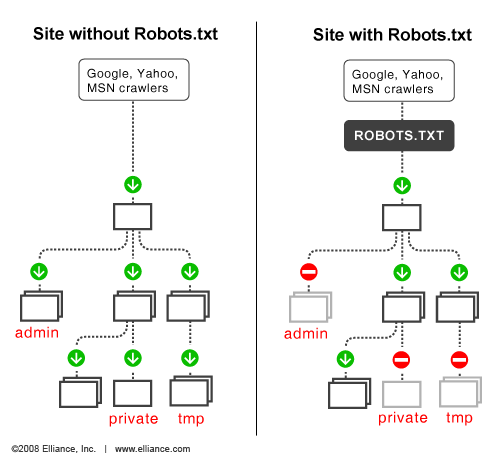
Robots.txt
Your website contains more than just the pages visitors see.
Behind the scenes, it may also contain administrative areas, internal resources, scripts, and other technical files that don't need to be explored by search engine crawlers.
A robots.txt file helps communicate crawling preferences to automated bots.
Understanding how this file works is important because an incorrect configuration can prevent search engines from accessing content you actually want them to discover.
What Is a Robots.txt File?
A robots.txt file is a text file located at the root of your website that provides instructions to crawlers about which areas they may or may not access.
One important distinction: robots.txt controls crawling, not indexing.
Blocking a URL in robots.txt does not guarantee that Google will remove it from search results. Google may still index a URL if it discovers it through other sources, even if it cannot crawl the page's content.
If you need to prevent a page from being indexed, use an appropriate noindex directive and make sure search engines can crawl the page to see that instruction.
When Should You Use Robots.txt?
Robots.txt can be useful for managing crawler access to areas that don't need to be crawled, reducing unnecessary crawling of certain URL patterns, and identifying your XML sitemap.
However, it should be configured carefully.
For example, accidentally blocking an entire website could prevent compliant search engine crawlers from accessing your website's pages.
That's not exactly the kind of SEO strategy that helps your business grow.
Before making changes to robots.txt, understand what each rule does and test the configuration. Google Search Console and Google's robots.txt testing documentation can help with troubleshooting.

LLMs.txt
As search continues to evolve, businesses are increasingly interested in how their websites are discovered and understood by AI-powered platforms.
Tools such as ChatGPT, Perplexity, and other AI assistants are changing how people research businesses, compare services, and find information.
This has created interest in a proposed website file called llms.txt.
However, it's important to understand what it does, and what it doesn't do, before adding it to your technical SEO checklist.
What is LLMs.txt?
The llms.txt file is a proposed convention designed to provide large language models with a curated, structured overview of a website's important information and resources.
Unlike an XML sitemap, which helps search engines discover URLs, an llms.txt file is intended to make useful website information easier for AI systems to access and interpret.
The goal is to create a concise, organized reference that makes important information easier for AI systems to interpret when they choose to use it.
Does LLMs.txt Improve SEO or Guarantee AI Visibility?
No. This is an important distinction.
LLMs.txt should be treated as an emerging, optional convention, not an established Google ranking factor or a guaranteed way to get your business mentioned by AI assistants.
There is no guarantee that ChatGPT, Google, or another AI platform will read, prioritize, or use the file.
It also does not replace your website's existing SEO foundations, structured data, XML sitemap, robots.txt, or other technical requirements.
Businesses should prioritize making their website content accurate, accessible, well-organized, and genuinely useful before spending significant time creating additional files.
For a deeper look at how AI assistants discover and reference business information, read our guide on How to Get Found on ChatGPT.

Technical SEO Checklist: 12 Things to Check on Your Website
Understanding technical SEO is one thing. Knowing what to check, where to look, and how to fix potential problems is where the real progress happens.
You don't need to be a developer to start improving your website's technical health. Many important checks can be completed using free tools such as Google Search Console, your website platform, and a few simple manual tests.
This technical SEO guide gives you 12 practical checks to help identify issues, strengthen your website's foundation, and make it easier for search engines to discover your content.
Whether you're managing a small business website or working through an advanced technical SEO guide to improve an established website, these checks provide a useful starting point.
Think of this as your what is technical SEO checklist: a practical way to review the technical elements that support your website's organic visibility.

Tip 1: Confirm That Important Website Pages Are Accessible to Search Engines
Before worrying about rankings, backlinks, or keyword optimization, make sure search engines can actually access your important website pages.
It sounds obvious, but you'd be surprised how easily a technical setting can prevent Google from accessing content you've spent hours creating.
Start by identifying the pages that matter most to your business. These typically include your homepage, primary service pages, product pages, location pages, and valuable educational resources.
Open these pages in an incognito browser window to confirm they load correctly without requiring a login or special permissions.
Then check whether search engines are allowed to crawl them.
How to Check Page Accessibility
Open Google Search Console and use the URL Inspection tool to examine important URLs.
Enter a page address and review the information Google provides about its availability, crawl status, and indexing eligibility.
Not every page on your website needs to be indexed. Login pages, private customer portals, and certain administrative resources may be intentionally restricted.
One of the most fundamental technical SEO optimization techniques is ensuring that important content can be discovered and processed by search engines.
For example, imagine your business offers website design, SEO, and digital advertising. If your main SEO service page is accidentally blocked from crawling, Google may struggle to access the information needed to understand that page.
You could have excellent content, professional branding, and a compelling offer, but the technical setup would be working against you.
While checking accessibility, it's also worth reviewing whether your website includes the pages customers need to understand and trust your business.
Explore our guide to Essential Pages for a Business Website to make sure your website has the right content foundation.

Tip 2: Check Google Search Console (GSC) for Indexing Errors
Google Search Console (GSC) is one of the most useful free tools available for monitoring your website's organic search performance and identifying technical issues.
If you're serious about improving your website's SEO, this is one tool you should become familiar with.
Google Search Console provides information about how Google discovers, crawls, and indexes your website. It also shows how your pages perform in Google Search, including impressions, clicks, click-through rates, and average search positions.
For technical SEO, one of its most important features is the Page Indexing report.
Start by opening your verified website property in Google Search Console.
Navigate to the Page Indexing report to review the pages Google has discovered and understand which URLs are indexed or excluded.
Pay attention to statuses such as:
Not Found (404)
Google discovered a URL, but the page no longer exists. Determine whether the page should be restored, redirected to a relevant replacement, or remain unavailable.
Server Error (5xx)
Google encountered a server-side problem when attempting to access a page. Investigate hosting issues, server configurations, or other technical problems.
Blocked by Robots.txt
Your robots.txt file is preventing Google from crawling the URL. Confirm whether this is intentional.
Excluded by Noindex Tag
The page contains an instruction telling search engines not to index it. Check whether this directive was added intentionally.
Duplicate Without User-Selected Canonical
Google identified a duplicate page but didn't receive a clear canonical preference from the website.
Crawled – Currently Not Indexed
Google crawled the page but hasn't included it in its index. Review the content, uniqueness, usefulness, and overall quality of the page.
Discovered – Currently Not Indexed
Google knows the URL exists but hasn't crawled it yet. This can happen for several reasons, including crawl prioritization and website accessibility.
Not every excluded URL represents an SEO problem.
Google may intentionally exclude duplicate pages, redirected URLs, and pages with noindex directives. Your job is to distinguish expected exclusions from problems affecting important content.
Start with indexing issues affecting your highest-value pages.
If your homepage and primary service pages are indexed correctly, move on to supporting content and lower-priority URLs.
This is one of the top technical SEO optimization checks because it helps you identify whether your most important website content is actually eligible to appear in Google Search.
Don't spend an afternoon trying to index a page that doesn't need to be indexed while your main service page is sitting in the digital equivalent of a locked storage room.

Tip 3: Review Robots.txt to Ensure It Does Not Block Important Content
Your robots.txt file provides instructions to compliant search engine crawlers about which areas of your website they should or shouldn't access.
A properly configured file can help manage crawling. A poorly configured one can unintentionally prevent search engines from accessing important pages.
That's why reviewing robots.txt should be part of your regular technical SEO maintenance.
Visit the following address using your domain: https://www.yourdomain.com/robots.txt
Review the instructions to understand which crawlers are being addressed and which URLs or directories are restricted.
A simple example might look like this:
User-agent: *
Disallow: /admin/
Sitemap: https://www.yourdomain.com/sitemap.xml
This configuration requests that compliant crawlers avoid the /admin/ directory while identifying the location of the website's XML sitemap.
If this instruction is applied unintentionally, it could prevent search engines from accessing your entire website.
Check that important service pages, blog posts, product pages, and other valuable resources aren't accidentally blocked.
Also review whether your sitemap URL is correct and whether any outdated instructions remain from a previous website configuration.
Remember, robots.txt is not a security feature and does not reliably prevent private information from being accessed. Sensitive content should be protected through proper authentication and access controls.
It's also important to understand that robots.txt controls crawling, not indexing. A blocked URL can sometimes still appear in search results if Google discovers it through other sources.
These are important technical SEO factors to understand before changing your website's crawl configuration.
If you're unsure whether a directive is necessary, investigate it before removing or adding instructions. One small change can affect how search engines access a large portion of your website.

Tip 4: Create and Submit an XML Sitemap Through Google Search Console
An XML sitemap helps search engines discover important URLs on your website.
Although Google can discover pages through internal links and other sources, a sitemap provides another way to communicate which pages are available for crawling.
For businesses regularly publishing new content, adding services, or expanding their websites, maintaining an accurate sitemap is an important part of technical SEO.
Many website platforms automatically generate an XML sitemap.
The exact location can vary depending on plugins, settings, and platform configurations.
Open the sitemap URL in your browser to confirm that it loads correctly.
If your website uses a sitemap index, you'll typically see links to additional sitemaps that contain different groups of URLs.
How to Submit Your Sitemap
Once you've confirmed that your sitemap is working:
Open Google Search Console.
Select your verified website property.
Navigate to the Sitemaps section.
Enter your sitemap URL.
Click Submit.
Review the status and investigate any errors.
After submission, Google can use the sitemap to discover URLs and identify updated content.
However, submitting a sitemap doesn't guarantee that every listed page will be crawled or indexed.
Google still evaluates individual pages before deciding whether to include them in its search index.
Your sitemap should contain canonical URLs that you want search engines to discover and potentially index.
Keep it updated as your website changes, make sure it uses the correct domain and protocol, and avoid including URLs that redirect or return errors.
These are simple but important technical SEO best practices that help maintain a clean and organized website.

Tip 5: Remove Unnecessary, Redirected, or Non-Indexable URLs From the Sitemap
Submitting an XML sitemap is a good start, but its accuracy matters just as much as its existence.
One common technical SEO issue is including URLs in your sitemap that shouldn't be there.
For example, your sitemap might contain outdated service pages, URLs that redirect to new destinations, duplicate pages, or pages marked with a noindex directive.
These inconsistencies can make it harder for search engines to interpret your website's intended structure.
Generally, your sitemap should exclude:
Redirected URLs
If an old service page redirects to a new URL, include the final destination rather than the redirected address.
404 Error Pages
URLs returning a not-found response should not normally remain in your sitemap.
Noindex Pages
Pages intentionally excluded from search results should generally not be included.
Duplicate URLs
If multiple URLs represent substantially the same page, use the preferred canonical version in your sitemap.
Non-Canonical URLs
Include the canonical URL you want search engines to consider, rather than alternate versions.
Start by reviewing your XML sitemap and comparing its URLs with the indexing information in Google Search Console.
For larger websites, SEO crawling tools such as Screaming Frog can help identify redirecting URLs, broken pages, non-indexable URLs, and canonical inconsistencies.
You can also review individual URLs using Google Search Console's URL Inspection tool.
As part of a regular technical SEO audit, prioritize cleaning up your sitemap whenever you redesign your website, restructure your services, or remove outdated content.
The goal isn't to have the largest sitemap possible. It's to have an accurate sitemap that reflects the pages you actually want search engines to discover.

Tip 6: Use a Flat Logical Offering-First Website Hierarchy
Your website should make it immediately clear what your business offers and where visitors can find the information they need.
An offering-first website hierarchy organizes your pages around the products and services your customers are searching for rather than burying them beneath unnecessary categories.
This approach supports both user experience and search engine understanding.
For example, imagine a Calgary-based construction company offering:
Residential Renovations
Commercial Construction
Basement Development
Exterior Renovations
Instead of placing all these services under a vague category such as "What We Do," you could create a clear structure:
Homepage → Services → Residential Renovations
Homepage → Services → Commercial Construction
Homepage → Services → Basement Development
Homepage → Services → Exterior Renovations
Each primary service can then connect to relevant supporting pages and educational resources.
This makes the website easier to navigate and creates a logical relationship between your offerings.
What Does a Flat Website Hierarchy Mean?
A relatively flat website hierarchy means that important pages can be reached through a small number of navigation steps.
For most small business websites, you should avoid making customers navigate through several unnecessary categories before reaching a service page.
However, flat doesn't mean every page should sit directly under the homepage.
A website with hundreds of pages still needs meaningful categories and subcategories. The objective is to create a structure that balances accessibility with organization.
Start by placing your main services within a clearly labelled Services section.
Create dedicated pages for important offerings rather than trying to explain everything on one oversized page.
Connect related services through contextual internal links and ensure your primary navigation provides access to the most important sections.
Then organize supporting content into relevant topic clusters.
For example, your technical SEO service or guide could be supported by articles about XML sitemaps, robots.txt, website architecture, structured data, and website performance.
Each supporting article should serve a distinct purpose and link naturally to related resources.
This is how to improve technical SEO while creating a website that can expand alongside your business.
A logical hierarchy also makes future website management easier. When you add another service, you already have a clear place for it instead of trying to squeeze it into a navigation menu that has become a game of digital Tetris.

Tip 7: Create Descriptive, Readable URLs with Primary Keywords
Your website's URLs should communicate what each page is about.
A clear URL structure helps visitors recognize the destination before clicking and provides search engines with additional context about your website's pages.
As part of your technical SEO optimization, review your existing URLs to ensure they're descriptive, consistent, and easy to understand.
What makes a good SEO-friendly URL?
Consider these examples:
Good URL Structure: avansta.com/blog/technical-seo-guide
Not so Good URL Structure: avansta.com/blog/?p=4837&category=12
The first URL clearly communicates the page's subject. The second provides little useful information to someone browsing the website.
When creating new URLs, use the primary keyword naturally when it accurately describes the content.
For example, a blog targeting "keyword research" could use: /blog/beginners-guide-to-keyword-research
Avoid forcing multiple keyword variations into the URL. A readable address is more useful than a long string of search terms.
Use hyphens to separate words, keep URLs concise, use lowercase consistently, and remove unnecessary numbers or parameters wherever possible.
Maintain a logical relationship between related pages without creating unnecessarily deep URL paths.
Most importantly, avoid changing established URLs without a reason.
If a URL needs to change, implement an appropriate redirect, update internal links, and revise your sitemap.
If you're still developing your keyword strategy, our Beginner's Guide to Keyword Research explains how to identify relevant search terms and map them to the right website pages.
The best URL structure starts with understanding what each page is meant to achieve.

Tip 8: Use Descriptive Internal Links to Supporting Pages
Internal links connect related pages on your website and help both visitors and search engines discover additional information.
However, simply adding links wherever there's an opportunity isn't enough.
Your internal linking strategy should create meaningful connections between your main service pages, supporting resources, and other relevant content.
For example, a blog post explaining website speed could link to a technical SEO guide, a responsive web design service page, and an article about Core Web Vitals.
Each link gives the reader an opportunity to explore a related topic without having to return to Google and start searching again.
Use Descriptive Anchor Text
Anchor text is the clickable text used in a hyperlink.
Instead of writing: "Learn more about our services here."
Use: "Explore our technical SEO services to improve your website's search visibility."
The second example tells visitors what they'll find when they click.
It also provides search engines with contextual information about the destination page.
Link Important Pages From Relevant Content
Your main service pages should receive internal links from related blog articles, resource pages, and other relevant sections of your website.
For example, if you publish an article about local search optimization, it makes sense to link to your Local SEO service page where readers can learn about professional support.
You should also connect related blog articles to one another when they provide additional value.
Aslo don't use the exact same keyword-rich anchor text repeatedly just because you want to influence rankings.
Write naturally and make sure every link provides a useful next step.
A good internal linking strategy should feel like helpful navigation, not a collection of links inserted to satisfy a search engine.

Tip 9: Fix Broken Internal Links
A broken internal link occurs when a hyperlink on your website points to a page that no longer exists or cannot be accessed.
These links can lead visitors to frustrating error pages and make it harder for search engines to navigate your website.
Imagine a potential customer reading an article about your services, clicking a link to learn more, and landing on a 404 error page.
Not exactly the strongest first impression.
Broken links are particularly common after website redesigns, URL changes, deleted blog posts, and service restructuring.
How to Find Broken Internal Links
For smaller websites, you can manually review important pages and click through their internal links.
For larger websites, crawling tools such as Screaming Frog SEO Spider can scan your website and identify internal links returning errors.
Google Search Console can also report URLs that return 404 errors, although it doesn't provide a complete list of every broken internal link on your website.
Once you've identified broken links, investigate the destination before making changes.
How to Fix Broken Links
There are a few ways to resolve the problem depending on the situation.
Update the Link
If the destination page still exists under a new URL, replace the old link with the correct address.
Add a Relevant 301 Redirect
If the original page has permanently moved, redirect it to the most relevant replacement.
Restore the Original Page
If a valuable page was accidentally deleted, restoring it may be the best option.
Remove the Link
If the destination is no longer relevant and there is no suitable replacement, remove the hyperlink.
Avoid redirecting every broken URL to your homepage. A redirect should provide a relevant destination, not simply send visitors somewhere else because you don't know what to do with the original page.
Regularly checking broken internal links helps maintain a smoother website experience and keeps your internal linking structure healthy.

Tip 10: Confirm That the Website Works Properly on Mobile Devices
Your website needs to work just as well on a smartphone as it does on a desktop computer.
A responsive layout is important, but mobile optimization goes beyond making your content fit a smaller screen.
Visitors should be able to read information, navigate between pages, interact with buttons, complete forms, and purchase products without unnecessary difficulty.
How to Test Your Website on Mobile
Start by opening your website on an actual smartphone.
Browse your homepage, main service pages, contact page, and other important sections.
Pay attention to how the website behaves when you scroll, open navigation menus, select buttons, and complete forms.
You can also use Google's PageSpeed Insights to evaluate mobile performance and identify opportunities to improve loading speed, responsiveness, and visual stability.
Pay particular attention to Core Web Vitals, including LCP, INP, and CLS.
A responsive preview inside your website builder is useful, but it doesn't always reflect how your website behaves across different devices, browsers, and screen sizes.
Testing on actual smartphones can reveal issues that aren't obvious when working from a desktop computer.
For a more detailed walkthrough, read our guide on How to Test Your Website is Mobile-Friendly.
Remember, your website is often the first interaction someone has with your business. Make sure that experience doesn't involve pinching, zooming, accidental clicks, and wondering where the contact button disappeared.

Tip 11: Create and Submit an LLMs.txt to Get Found on ChatGPT & AI Searches
Search is evolving beyond traditional search engines.
People are increasingly using AI-powered tools such as ChatGPT and Gemini to research companies, compare services, ask questions, and find recommendations.
This creates another opportunity for businesses to make their online information clear, consistent, and accessible.
One emerging convention worth understanding is llms.txt.
An llms.txt file is a proposed Markdown-based format designed to provide AI systems with a curated overview of a website's important information and resources.
It can include your business identity, services, service areas, key pages, and other relevant information.
How to Create an LLMs.txt File
Create a plain-text file named: llms.txt
Place it in the root directory of your website so it can be accessed through: https://www.yourdomain.com/llms.txt
Organize the file using clear headings and concise descriptions.
A small business could include:
Business name and overview.
Core products, services and solutions.
Target audience.
Service areas.
Important website pages.
Relevant reviews, testimonials, and case studies.
Contact information.
Links to helpful resources.
Keep the information accurate and consistent with the content published on your website.
If your services, pricing, or business details change, review the file to ensure it remains current.
Does LLMs.txt Guarantee That ChatGPT Will Find Your Business?
This is where it's important to separate emerging AI search practices from established technical SEO requirements.
llms.txt is not an established Google ranking factor, and there is no guarantee that ChatGPT or other AI platforms will read or use the file.
Creating one may be a useful experiment for organizing information, but it should not replace the fundamentals of search optimization.
Focus on publishing accurate business information, creating genuinely helpful content, maintaining a technically accessible website, and building a recognizable online presence.
These activities provide a much stronger foundation for visibility across traditional search engines and AI-powered discovery tools.
For a deeper look at how businesses can improve their visibility in AI-powered platforms, explore our guide to How to Get Found on ChatGPT.
Among the different technical SEO types and emerging AI-related practices, this is best viewed as an optional addition rather than a priority ahead of your core website optimization.

Tip 12: Use Descriptive Schema Markups for Key Pages
Schema markup helps search engines understand the content and context of your website.
By adding structured data to relevant pages, you can provide additional information about your business, services, products, articles, and other content.
This is an important part of the technical SEO work involved in helping search engines interpret your website accurately.
However, schema markup should be implemented strategically. Adding every available schema type to every page doesn't make your website more optimized.
The goal is to describe the content that actually exists.
Start With Your Business Information
For your homepage or primary business information page, consider appropriate Organization or LocalBusiness structured data.
This can communicate details such as your official business name, website, logo, address, and contact information where applicable.
For local businesses, ensure that the information is consistent with your actual business details and other trusted business listings.
Use Relevant Schema For Your Main Pages
Different pages may benefit from different structured data types.
Homepage
Organization or an appropriate LocalBusiness subtype.
Service Pages
Service schema where relevant.
Product Pages
Product schema with accurate product information.
Blog Posts
Article or BlogPosting schema.
Navigation
BreadcrumbList schema.
The correct implementation depends on the page content and Google's supported search features.
Review your structured data whenever you redesign your website, change business information, add new page types, or introduce new products and services.
This helps keep your website's structured information accurate as your business evolves.
When implemented correctly, schema markup supports the broader technical foundation of your website and helps search engines interpret the content you're publishing.
How to Fix Common Google Indexing Issues
You've created your website, published valuable content, optimized your pages, and submitted your XML sitemap. But how do you know whether Google has actually added those pages to its search index?
This is where website indexing becomes important.
Even if your website is technically accessible, Google doesn't automatically index every page it discovers. Pages can be delayed, excluded, blocked, or considered unsuitable for inclusion in search results.
Understanding how indexing works, and knowing how to troubleshoot common problems, is an essential part of maintaining your website's technical SEO.
In this section, we'll walk through how to check whether Google has indexed your website, identify common indexing statuses, and fix the issues that may prevent your important pages from appearing in search results.

What Happens When Google Cannot Crawl or Index Your Website?
Before fixing indexing problems, it's important to understand the difference between crawling and indexing.
Crawling is the process Google uses to discover and access website pages. Google uses automated programs called crawlers, including Googlebot, to visit URLs, retrieve content, and follow links to discover additional pages.
Indexing happens after Google processes the information it finds on a page. Google analyzes the page's content, images, metadata, and other signals to determine whether it should be included in its search index.
If a page is indexed, it becomes eligible to appear in relevant Google Search results. However, indexing does not guarantee that the page will rank for a particular keyword or appear for every search.
How to Check If Google Has Indexed Your Website
The easiest way to check whether Google has indexed a specific page is through Google Search Console (GSC).
This free tool provides information about how Google accesses and processes your website, including whether individual URLs are indexed and whether Google has identified any issues.
Follow these steps to inspect your website pages.
Step 1: Open Google Search Console
Visit Google Search Console and sign in using your Google account.
If you haven't set up Google Search Console yet, you'll need to add and verify your website before accessing its indexing information.
Step 2: Select the Correct Website Property
Once you're inside Google Search Console, select the website property you want to investigate.
Make sure you're using the correct version of your website, including the appropriate domain and protocol.
For example, https://www.yourdomain.com and https://yourdomain.com can be represented differently depending on how your properties are configured.
If you've set up a Domain property, it can provide a broader view of your website across its subdomains and protocols.
Step 3: Open the URL Inspection Tool
Find the URL Inspection tool near the top of the Google Search Console dashboard.
This tool allows you to examine how Google understands a specific URL and whether it has been included in the search index.
Step 4: Enter the URL You Want to Check
Copy the full URL of the page you want to inspect and paste it into the URL Inspection search bar.
For example: https://www.yourdomain.com/services/website-design
Press Enter and allow Google Search Console to retrieve the available information.
Step 5: Review the Indexing Status and Any Reported Issues
Google Search Console will display information about the URL's indexing status.
Look for messages indicating whether the page is indexed, excluded, or experiencing an issue that could prevent indexing.
Depending on the status, you may see information about:
Whether the URL is available on Google.
The last time Google crawled the page.
Whether crawling is allowed.
Whether indexing is allowed.
The page's user-declared canonical URL.
The Google-selected canonical URL.
Any reported indexing or accessibility issues.
Pay particular attention to the difference between crawling and indexing. A page can be accessible to Googlebot but still not appear in Google's index.
Step 6: If Appropriate, Request Indexing After Fixing the Underlying Ussue
If you've corrected an issue affecting an important page, you can use the Request Indexing option within URL Inspection.
Google will generally check the URL and may add it to a priority crawling queue.
However, requesting indexing does not guarantee that Google will crawl the page immediately or include it in its index.
Before requesting indexing, make sure the underlying issue has actually been resolved. Repeatedly submitting the same URL without addressing the problem is unlikely to help.

How to Fix Common Google Indexing Issues
Google Search Console reports several indexing statuses that can help you understand why certain pages aren't appearing in search results.
Some indicate genuine technical problems, while others simply describe how Google has processed a URL.
Here are five common statuses worth understanding and how to address them.
Discovered – Currently Not Indexed
Google has discovered the URL but hasn't crawled it yet.
In other words, Google knows the page exists but hasn't retrieved its content to evaluate it for indexing.
This can happen when Google determines that crawling the URL isn't currently a priority. It may also be associated with crawl capacity, website performance, or the way your website's pages are organized.
Start by checking whether the page is included in your XML sitemap and connected to other relevant pages through internal links.
Then review the following:
Improve Internal Linking
Link to the page from relevant, accessible pages on your website. Important pages shouldn't be difficult for search engines to discover.
Check Your XML Sitemap
Make sure the URL is included in your sitemap if it's an important canonical page you want indexed.
Review Website Performance
Investigate server errors, slow responses, and other issues that could make crawling difficult.
Check Your Website Structure
Make sure important pages aren't buried beneath several unnecessary navigation layers.
Review URL Accessibility
Confirm that the page isn't blocked by robots.txt or restricted by other technical configurations.
imagine you've published a new service page but haven't linked to it anywhere on your website. Google might discover the URL through your sitemap, but the page may have limited internal signals helping it understand where it belongs.
Adding relevant internal links can improve discoverability and help establish the page's relationship with the rest of your website.
Once you've addressed any problems, you can inspect the URL and request indexing.
Keep in mind that this status doesn't automatically mean something is broken. Google decides when and whether to crawl discovered URLs.
Crawled – Currently Not Indexed
Google has successfully crawled the page but hasn't included it in its search index.
Unlike the previous status, Google has already accessed the URL. The issue isn't necessarily crawl accessibility; Google has simply not selected the page for indexing.
This can happen when a page offers limited additional value, contains substantially similar content to another URL, or otherwise isn't considered suitable for inclusion in the index.
Start by reviewing the actual content on the page.
Ask yourself whether it provides enough useful information to deserve its own place in search results.
Consider these improvements:
Improve Content Quality
Add useful information, practical examples, original insights, and details that genuinely help visitors.
Address Duplicate Content
If the page substantially overlaps with another URL, consider consolidating the content or implementing the appropriate canonical configuration.
Improve Search Intent Alignment
Make sure the page addresses the topic and questions visitors are likely searching for.
Strengthen Internal Links
Connect the page to relevant service pages, category pages, and supporting resources.
Review Technical Directives
Check for accidental noindex tags, incorrect canonical URLs, or other conflicting indexing instructions.
Imagine your website has three blog posts explaining nearly identical aspects of website maintenance.
If each article repeats the same information without providing a distinct perspective, Google may decide that some pages don't offer enough additional value to warrant separate indexing.
You could improve the articles by giving each one a clear purpose, combining overlapping information, or redirecting outdated content to a stronger replacement where appropriate.
Blocked by Robots.txt
Google has identified that your robots.txt file prevents it from crawling the URL.
Your robots.txt file contains instructions for compliant crawlers about which areas of your website they should avoid accessing.
If an important service page or blog post is accidentally blocked, Google may not be able to crawl its content.
Start by opening your robots.txt file.
Look for any Disallow directives that could be preventing Googlebot from accessing the affected URL.
If this was added accidentally, you'll need to review and correct the configuration.
If an important page is being blocked, review the relevant directive and remove or adjust it where appropriate.
Once you've corrected the configuration, use the URL Inspection tool to check the page again.
If the URL was previously indexed or discovered, Google will need to recrawl it to process the updated instructions.
Excluded by Noindex
Google has identified a noindex directive telling it not to include the page in its search index.
Unlike robots.txt, which controls crawling, a noindex directive specifically instructs search engines not to index a page.
This instruction can be implemented through an HTML meta tag or an HTTP response header.
Noindex directives are useful when you intentionally want to keep certain pages out of search results, but they can cause problems when applied to important content accidentally.
First, determine whether the page should actually be indexed.
If it's a private login page, internal search results page, or another resource that doesn't belong in Google Search, the noindex directive may be intentional.
However, if the affected URL is an important service page, product page, or blog post, you'll want to investigate further.
Check the following:
Review Your Page Settings
Website builders and content management systems often provide SEO settings that allow you to disable indexing.
Check Your SEO Plugins
On platforms such as WordPress, SEO plugins can add noindex directives to individual pages or entire content types.
Inspect the Page Source
Look for a robots meta tag containing noindex.
Check HTTP Response Headers
A server can also send an X-Robots-Tag: noindex directive.
Review Website-Wide Settings
Make sure your website hasn't been configured to discourage search engines from indexing important pages.
If the directive was added accidentally, remove it and confirm that the page is accessible to Googlebot.
Once the change has been published, return to Google Search Console, inspect the URL, and request indexing.
Don't forget to check whether the page has both a robots.txt restriction and a noindex directive. Google generally needs to crawl a page to see its noindex instruction, so blocking the URL in robots.txt can prevent Google from reading that directive.
Make Indexing Checks Part of Your Technical SEO Routine
Indexing problems can prevent important website pages from appearing in Google Search, even when you've invested time and resources into creating valuable content.
Make a habit of reviewing Google Search Console, monitoring your important URLs, and investigating unexpected indexing changes.
Not every excluded page is a problem, and requesting indexing won't automatically resolve an underlying technical issue.
The key is understanding why Google has excluded a page and determining whether that exclusion is intentional.
By identifying and resolving common technical SEO issues, you can help ensure that your website's most important content is accessible, discoverable, and eligible for indexing.
A consistent approach to website technical SEO gives your content a stronger foundation to compete in organic search.
Conclusion
Your website can have excellent content, professional design, and a great offer, but if search engines struggle to access, understand, or index its pages, you're making it harder for potential customers to find your business.
That's why technical SEO matters.
Throughout this technical SEO guide, we've covered the essential elements that help search engines discover and understand your website.
From website architecture, XML sitemaps, and mobile optimization to structured data, robots.txt, and Google indexing issues, each component contributes to a stronger technical foundation.
But what is technical SEO in digital marketing when you look beyond the technical terminology?
It's about making sure your website is built to support your broader marketing efforts. It's the foundation that helps your content get discovered, your service pages become eligible for search results, and your online presence grow over time.
The best approach isn't to fix everything at once. Start by reviewing your website's accessibility, checking Google Search Console, improving your site structure, and addressing the technical issues affecting your most important pages.
Then make technical SEO part of your ongoing website maintenance. As your business grows, your website will evolve, and regular reviews can help prevent small technical problems from becoming bigger obstacles.
Whether you're just getting started or working through more comprehensive technical SEO guides, remember that optimization is an ongoing process, not a one-time project.
If you're ready to take the next step, explore our Beginner's Guide to SEO to understand how technical SEO fits into the bigger picture of search engine optimization.
And if you're looking to strengthen more than just your website, download our free e-book, How to Build Your Business's Online Presence in 90 Days. It walks you through the steps to establish your online foundation and create a digital presence that supports long-term business growth.
Your website should work as hard as you do. Build the right foundation, keep improving it, and give your business more opportunities to get found online.
Frequently Asked Questions (FAQ)
What is technical SEO in simple words?
Technical SEO is the process of improving your website's technical foundation so search engines like Google can find, crawl, understand, and index your pages. It includes website speed, mobile-friendliness, site structure, XML sitemaps, robots.txt, indexing settings, and structured data. The goal is to make your website easier for search engines to access while providing visitors with a better experience.
What is the difference between SEO and technical SEO?
SEO is the overall process of improving a website's visibility in search engines, while technical SEO focuses specifically on the behind-the-scenes elements that support that visibility.
SEO generally includes three main areas:
Technical SEO: Improves website structure, crawlability, indexing, performance, and accessibility.
On-page SEO: Optimizes page content, headings, keywords, images, and internal links.
Off-page SEO: Builds authority and credibility through backlinks, brand mentions, and other external signals.
Technical SEO is one part of a broader SEO strategy. Strong results typically require all three areas to work together.
Is SEO dead now with AI?
No, SEO is not dead. However, search is evolving as AI-powered tools such as ChatGPT, Google's AI Overviews, and Perplexity change how people discover information.
Businesses still benefit from creating helpful content, maintaining technically sound websites, building authority, and providing accurate information. AI search introduces additional opportunities for online visibility, but it doesn't eliminate the importance of traditional search engine optimization.
The best approach is to create a strong online presence that serves both people and search engines rather than relying on outdated keyword tactics.
What is the 80/20 rule of SEO?
The 80/20 rule of SEO is a general productivity principle suggesting that a relatively small number of SEO activities may produce a large portion of your results.
For example, improving your most important service pages, targeting relevant keywords, fixing major technical issues, and earning quality backlinks may have a greater impact than making dozens of minor optimizations.
It isn't a fixed Google ranking formula or an official SEO rule. The exact activities that produce the greatest results depend on your website, industry, competition, and existing performance.
For most small businesses, start with the pages and improvements most likely to attract relevant customers.
How do I learn SEO as a beginner?
The best way to learn SEO as a beginner is to understand the fundamentals, apply them to a real website, and measure your progress.
Start by learning keyword research, search intent, on-page SEO, technical SEO, and link building. Then set up free tools such as Google Search Console and Google Analytics to monitor your website's performance.
A learning path includes:
Understand how search engines discover and rank content.
Learn how to research relevant keywords.
Optimize website pages for search intent.
Understand technical SEO fundamentals.
Build internal links and earn relevant backlinks.
Monitor results and improve your strategy over time.
Can ChatGPT do SEO?
Yes. ChatGPT can assist with many SEO activities, including keyword research, content planning, title tags, meta descriptions, content optimization, technical SEO explanations, and website audits when provided with the necessary information.
It can also help identify potential issues in website content, generate structured data examples, and develop SEO strategies.
However, ChatGPT does not automatically have access to your website's technical configuration, Google Search Console data, or live ranking performance. Its recommendations should be reviewed and validated using reliable SEO tools and current search engine documentation.
Think of ChatGPT as an SEO assistant that can speed up research and planning, not a replacement for technical expertise, reliable data, or human judgment.
Why is technical SEO important for a website?
Technical SEO is important because it helps search engines access, crawl, understand, and index your website's content. Without a technically accessible website, even valuable pages may struggle to appear in search results.
It also supports a better user experience through improvements to mobile usability, website performance, navigation, and accessibility.
For businesses, technical SEO helps establish the foundation needed for content marketing, local SEO, and other digital marketing activities to work effectively.
It doesn't guarantee higher rankings, but it helps remove technical obstacles that could limit your website's search visibility.Technical SEO includes the behind-the-scenes optimizations that help search engines access and understand your website.
What does technical SEO include?
Technical SEO includes the behind-the-scenes optimizations that help search engines access and understand your website.
Common technical SEO elements include:
Website architecture and URL structure.
XML sitemaps and robots.txt configuration.
Website crawling and indexing.
Mobile-friendly and responsive design.
Website speed and Core Web Vitals.
HTTPS and website security.
Canonical tags and duplicate content management.
Structured data and schema markup.
Internal linking and website navigation.
Redirects and broken link management.
International SEO configurations, when applicable.
Server performance and website accessibility.
The specific requirements depend on your website's size, platform, structure, and business objectives.
How does technical SEO work?
Technical SEO works by improving the way your website is structured, accessed, and processed by search engines.
Google generally follows three main stages when handling website content:
Crawling: Google discovers URLs and uses automated crawlers, such as Googlebot, to access website pages.
Indexing: Google processes the content and information it finds to determine whether a page should be included in its search index.
Serving search results: Google uses its ranking systems to determine which indexed pages are relevant to a user's search.
Technical SEO helps support these processes by improving crawlability, indexing signals, website structure, page accessibility, and performance.
However, technical SEO is only one part of ranking. Content relevance, quality, competition, and other ranking signals also influence search visibility.
Is technical SEO difficult?
Technical SEO can be challenging, but the fundamentals are manageable for most website owners.
Tasks such as submitting an XML sitemap, checking Google Search Console, improving internal links, and updating page titles are relatively straightforward.
More advanced work, such as resolving JavaScript rendering issues, server configuration problems, complex canonicalization, and website migrations, may require a developer or experienced SEO professional.
You don't need to understand every technical detail to get started. Focus on the most important issues first and gradually work through more advanced optimizations as your website grows.
Do small businesses need technical SEO?
Yes. Small businesses need technical SEO because search engines must be able to access and understand their websites regardless of business size.
A local contractor, restaurant, professional service provider, or online retailer can all benefit from a technically sound website.
Important priorities for small businesses include mobile-friendly design, fast-loading pages, clear service page structures, accurate XML sitemaps, proper indexing settings, and Google Search Console monitoring.
You don't necessarily need an advanced technical SEO strategy or expensive tools. Start by ensuring your most important pages are accessible, useful, and properly configured.
Can I do technical SEO myself?
Yes. Many technical SEO tasks can be completed without hiring a developer, especially if your website uses a platform such as WordPress, Wix Studio, Squarespace, or Shopify.
You can use Google Search Console to monitor indexing, submit XML sitemaps, review URL accessibility, and identify common technical issues.
You can also improve page structure, review internal links, optimize images, check mobile usability, and update basic SEO settings through your website platform.
However, complex problems involving server configurations, JavaScript rendering, large-scale redirects, or website migrations may require professional support.
The best approach is to handle manageable improvements yourself and seek help when technical changes could affect your entire website.
How does Google find and index my website?
Google discovers websites through links from other websites, internal links, submitted XML sitemaps, and other discovery processes.
Once Google discovers a URL, Googlebot may crawl the page to retrieve its content. Google then processes the information and determines whether the page is suitable for inclusion in its search index.
To help Google discover your website:
Create and submit an XML sitemap through Google Search Console.
Build clear internal links between important pages.
Make sure your website is accessible to Googlebot.
Avoid accidental robots.txt restrictions and noindex directives.
Publish useful, original content.
Monitor indexing through Google Search Console.
Submitting a sitemap can help Google discover your URLs, but it does not guarantee that every page will be crawled or indexed.
Why are my website pages not appearing on Google?
Your website pages may not appear on Google because they haven't been discovered, crawled, or indexed, or because Google has determined that they shouldn't be included in its search index.
Common reasons include:
The page is blocked by robots.txt.
A noindex directive prevents indexing.
Google has discovered the URL but hasn't crawled it.
Google crawled the page but hasn't indexed it.
The page contains duplicate or substantially similar content.
The page has technical errors or incorrect canonical tags.
The website is new and Google hasn't discovered its pages yet.
Start by entering the affected URL into Google Search Console's URL Inspection tool. Review the indexing status, identify the reported issue, and correct the underlying problem before requesting indexing.
Also remember that an indexed page may not appear prominently for a particular keyword. Indexing and ranking are two different things.
How do I get Google to crawl my website?
To help Google crawl your website, make sure your important pages are accessible, internally linked, and included in an accurate XML sitemap.
You can also use Google Search Console to inspect individual URLs and request indexing after making changes.
Follow these steps:
Set up and verify your website in Google Search Console.
Create or locate your XML sitemap.
Submit the sitemap through the Sitemaps report.
Make sure important pages aren't blocked by robots.txt.
Add relevant internal links to important pages.
Check that your pages return successful HTTP responses.
Use URL Inspection to request indexing for updated or newly published pages.
Google determines its own crawling schedule, so requesting indexing does not guarantee immediate crawling.
For larger websites, maintaining a logical site structure and avoiding unnecessary duplicate URLs can also help search engines use their crawling resources more effectively.
What does a technical SEO audit include?
A technical SEO audit evaluates your website's technical health and identifies issues that could affect crawling, indexing, performance, and search visibility.
A comprehensive audit typically includes:
Crawlability: Checks whether search engines can access important website pages.
Indexing: Reviews which pages are indexed, excluded, or experiencing indexing issues.
Website architecture: Evaluates navigation, page hierarchy, URL structure, and internal linking.
XML sitemaps: Checks sitemap accuracy, accessibility, and submission status.
Robots.txt: Identifies crawling restrictions that may affect important content.
Canonicalization: Reviews duplicate URLs and canonical tags.
Mobile optimization: Checks responsive design and mobile usability.
Website performance: Evaluates loading speed and Core Web Vitals.
Structured data: Validates relevant schema markup and identifies implementation errors.
Redirects and broken links: Finds redirect chains, broken URLs, and unnecessary redirects.
HTTPS and security: Checks secure connections and common configuration issues.
The final audit should prioritize issues based on their impact, affected pages, and the effort required to resolve them.


Comments