
What Is the Difference Between Web Design and Web Development?

If you've ever wondered what is the difference between web design and web development, you're not alone. The terms are often used interchangeably, even though they involve different skills, responsibilities, and processes.
Understanding how they work can help you make better decisions when planning a new website, hiring a professional, or improving your existing online presence.
The simplest way to understand web design vs web development is to think about the experience versus the technology behind it.
Web design focuses on how a website looks, feels, and guides visitors.
Web development focuses on building the website, implementing its functionality, and making sure everything works as intended.
So, web developer vs web designer which is better?

Neither role is automatically better than the other. They solve different problems, and most successful websites need both.
A great design needs the right technical foundation, while strong development needs a clear, user-friendly design to bring everything together.
Whether you're building your first business website or planning a complete redesign, understanding these differences is a great place to start.
Our guides on How to Build a Website for a Business and Essential Pages for Business Websites can also help you understand the bigger picture before getting started.
In this guide, we'll break down what web designers and web developers do, the skills and tools they use, how their responsibilities differ, and why both are important when creating a website that supports your business goals.
Table of Content

What Is the Difference Between Web Design and Web Development?
Web design and web development are two essential parts of building a successful website. Although the terms are often used interchangeably, they refer to different responsibilities that work together to create an effective online experience.
Web design focuses on how a website looks, feels, and guides visitors through its content. Web development focuses on how the website is built, how its features function, and how everything works behind the scenes.
Think of it this way: a web designer plans the experience, while a web developer brings that experience to life through technology. One makes sure your website looks like it belongs in your business.
The other makes sure the buttons, forms, shopping carts, and other features actually do what they're supposed to do. Ideally, both happen without anyone having to send a strongly worded email.
Understanding what is the difference between web design and web development can help you make better decisions when hiring a website professional, planning a redesign, or investing in a new website. It also helps you understand which skills your project needs and why the two disciplines should work together.
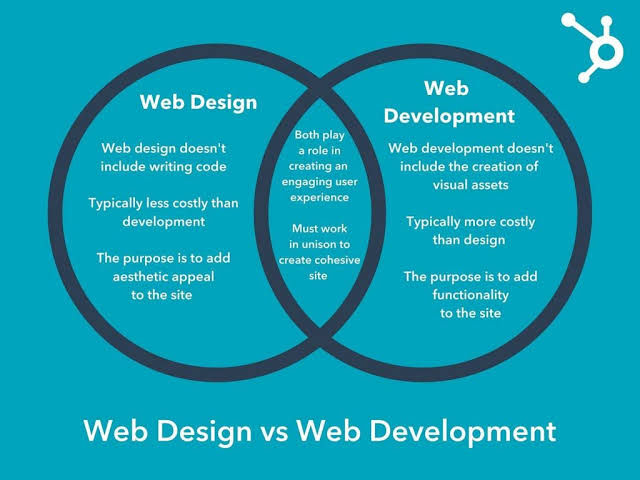
The biggest difference between web design and web development is their primary focus. Web design is concerned with the visual presentation and user experience, while web development is concerned with the technical structure and functionality.
However, the responsibilities aren't always separated into two completely different roles. Some professionals handle both, particularly when building websites for small businesses. The distinction becomes more important as a website grows in complexity.
Here's how web designers vs web developers compare across the most important areas of a website project.
Factor | Web Design | Web Development |
Primary Focus | Visual appearance, layout, branding, and user experience (UX). | Technical functionality, website structure, performance, and integrations. |
Main Question | How should the website look and how should visitors experience it? | How should the website work and how can we make it function reliably? |
Key Responsibilities | Creating layouts, selecting colours and typography, designing navigation, planning user journeys, and developing visual concepts. | Writing and maintaining code, building website components, connecting databases, implementing features, and troubleshooting technical issues. |
Typical Deliverables | Wireframes, mockups, prototypes, design systems, page layouts, and visual assets. | Functional web pages, interactive features, forms, databases, integrations, and a working website. |
Skills | Visual design, UX/UI design, branding, layout composition, accessibility, and user research. | Programming, problem-solving, front-end and back-end development, database management, and technical optimization. |
Tools & Software | Figma, Adobe Photoshop, Adobe Illustrator, and other visual design tools. | HTML, CSS, JavaScript, PHP, Python, databases, code editors, and development frameworks. |
Overlap | May work with website builders, implement responsive layouts, and make basic content or styling changes. | May contribute to visual decisions, implement designs, and improve the user experience through technical solutions. |
Is Web Design Part of Web Development?
Web design and web development are closely connected, but they are not the same discipline. Web design is generally considered a separate part of the website creation process, rather than a technical subset of web development.
Web design establishes the visual direction and user experience. Web development uses code, platforms, and other technologies to implement that direction and make the website functional.
However, the two disciplines overlap considerably, especially in modern website projects. A front-end developer may have a strong understanding of visual design, while a web designer working with a website builder may also handle implementation.
This is why the question is web design the same as web development doesn't have a simple yes-or-no answer when discussing real-world projects. They are different responsibilities that often require collaboration.
How Web Design and Web Development Work Together
Consider a small business launching a new website with five pages: Home, About, Services, Blog, and Contact.
The web designer begins by planning the visitor experience. They establish the visual direction, organize the page content, create layouts, and determine how visitors should move through the website.
Once the design is approved, the web developer builds the pages and implements the required functionality. This could include responsive navigation, contact forms, blog functionality, analytics tracking, and integrations with other business tools.
The process doesn't necessarily end when the website launches. Designers may refine layouts based on user feedback, while developers address technical issues, improve performance, and implement new features.
For a business, this collaboration creates a website that is not only visually appealing but also practical, accessible, and capable of supporting growth.
Why the Difference Matters When Building a Business Website
Understanding web developers vs web designers helps business owners identify what they actually need before hiring someone or investing in a website project.
If your website looks outdated, has inconsistent branding, or makes it difficult for visitors to find information, you may need design improvements.
If your website has broken functionality, unreliable forms, slow technical performance, or complicated integrations, development work may be required.
Many projects need both. A website redesign, for example, may involve improving the visual experience while rebuilding the underlying structure and functionality.
The important thing is to avoid treating a website as a one-time design exercise. Your website should support how your business attracts customers, communicates value, generates leads, and manages operations.
Can One Person Do Both Web Design and Web Development?
Yes. One person can absolutely handle both web design and web development. These professionals are often described as full-stack designers, designer-developers, or simply web designers and developers, depending on their skills and the type of work they perform.
This is particularly common among freelancers, independent website professionals, and smaller digital agencies that manage projects from initial concept through launch.
However, being able to do both doesn't automatically mean someone has the same level of expertise in every area. Designing an effective user experience and developing complex technical functionality require different skill sets.
The web designer vs web developer difference becomes especially important when a project requires advanced functionality, custom software, or multiple integrations.
When Should You Hire Someone Who Does Both?
Hiring one professional to handle both design and development can be a practical choice when building a relatively straightforward business website.
A service-based business, consultant, local contractor, or small professional firm may not need a separate designer and developer if the project can be delivered effectively through an established website platform.
The key is to evaluate the professional's actual capabilities, not just the number of services listed on their website.
Ask to see examples of their design work, review the functionality of websites they've built, and confirm that they understand mobile responsiveness, accessibility, website performance, and basic SEO.
A good-looking portfolio is a great start. A website that actually works is an even better one.

What Is Web Design?
Web design is the process of planning and creating the visual appearance, structure, and user experience of a website. It determines how a website looks, how information is organized, and how easily visitors can find what they need.
However, effective web design goes far beyond choosing attractive colours, selecting fonts, and adding a few images. It involves understanding the people visiting your website, what they're looking for, and how the design can guide them toward taking action.
For a business, that action might be requesting a quote, booking an appointment, purchasing a product, subscribing to a newsletter, or getting in touch with the team.
A well-designed website brings together branding, usability, accessibility, and conversion-focused layouts to create an online experience that supports business objectives.
So, what is web design and web development, and where does one end and the other begin? Web design establishes the visual and experiential direction of a website, while web development focuses on building the technical functionality that makes it work. Although they work closely together, each requires a different set of skills and considerations.
If you're planning a new website or redesigning an existing one, understanding the design process is an important first step. Our Complete Guide to the Web Design Process can help you understand how a website moves from initial planning and research to design, development, and launch.
What Does a Web Designer Do?
A web designer is responsible for planning and creating the visual and interactive experience of a website. Their job is to make sure the website communicates the right message, reflects the company's brand, and makes it easy for visitors to navigate and take action.
A professional web designer considers both the business behind the website and the people using it. After all, a website shouldn't just look good in a portfolio. It needs to work for the people who actually visit it.
Here are some of the key responsibilities of a web designer.

Planning Page Layouts and Visual Hierarchy
Before designing individual pages, a web designer determines how information should be organized and presented.
This involves establishing a visual hierarchy that helps visitors understand what matters most. Important headlines, service descriptions, images, and calls to action should appear in an order that makes sense.
For example, a local roofing company might prioritize its main services, service area, customer reviews, and quote request button. Visitors should be able to understand what the company does and how to contact it without searching through five different pages.
Good page layouts reduce confusion and help visitors move naturally through the website.
Choosing Typography, Colours, Imagery, and Design Elements
A web designer selects the visual elements that give a website its identity. This includes typography, colour palettes, imagery, icons, buttons, spacing, and other design components.
These decisions should reflect the company's branding while supporting readability and usability.
For example, a professional accounting firm may benefit from a clean, structured design with clear typography and a restrained colour palette. A creative studio may use more expressive visuals, distinctive typography, and bold design elements.
The goal isn't to make every website look the same. It's to create a visual experience that makes sense for the business and its audience.

Creating Wireframes and Prototypes
Wireframes are simplified layouts that show where key website elements will appear before the final visual design is created.
They help designers plan page structure, content placement, navigation, and functionality without getting distracted by colours, images, or decorative details.
Prototypes take this a step further by creating interactive representations of the proposed website. They can demonstrate how menus, buttons, page transitions, and other elements should behave.
These tools allow business owners and project teams to review the experience before development begins. Making changes to a prototype is generally much easier than rebuilding a completed website because someone decided the main navigation should be somewhere else.
Designing Navigation and Calls to Action
Website navigation helps visitors find the information they're looking for. A web designer determines how menus, links, buttons, and page sections should be organized to create a clear path through the website.
Calls to action (CTAs) are equally important. They encourage visitors to take the next step, whether that's booking a consultation, requesting a quote, or making a purchase.
For example, a service-based business might use a prominent "Get a Free Quote" button on its homepage and repeat relevant calls to action throughout its service pages.
The placement, wording, visibility, and design of these elements can influence how effectively a website turns visitors into leads or customers.
Improving Usability, Accessibility, and Responsive Layouts
A website should be easy to use regardless of someone's device, browsing experience, or accessibility requirements.
Web designers consider factors such as readable text, sufficient colour contrast, clear navigation, understandable buttons, and consistent layouts. They also plan how pages should adapt to different screen sizes.
Responsive design ensures that a website can adjust to desktops, tablets, and smartphones rather than forcing visitors to zoom, scroll sideways, or struggle with tiny buttons.
Accessibility is another important consideration. Design decisions should help people with different abilities interact with website content, including users who rely on keyboard navigation or assistive technologies.
A website that only works properly on the designer's large desktop monitor isn't finished. It's just having a very good day in one particular environment.

Aligning Website Design With the Company's Brand and Goals
A business website should communicate a consistent identity and support the company's broader objectives.
A web designer considers the brand's personality, target audience, industry, positioning, and value proposition when making design decisions.
For example, a luxury home builder and an affordable home renovation contractor may offer related services, but their websites should communicate different brand experiences.
The luxury builder may emphasize high-quality photography, detailed project showcases, and refined typography. The renovation contractor may prioritize service information, customer reviews, transparent messaging, and easy quote requests.
This is where the web designer vs web developer difference becomes particularly important. A designer determines how the website should communicate and guide visitors, while a developer implements the technical features needed to support that experience.
What Are the Main Elements of Web Design?
Effective website design combines several elements that influence how visitors perceive, navigate, and interact with a business online.
A website can have beautiful graphics and still be difficult to use. It can also have excellent functionality but fail to communicate why someone should choose the business.
The best results come from balancing visual presentation with practical usability and clear business objectives.

User Interface (UI) Design
User interface (UI) design focuses on the visual and interactive elements people use when navigating a website.
This includes buttons, menus, forms, icons, input fields, navigation bars, and other interface components.
A strong UI makes these elements recognizable, consistent, and easy to interact with. Visitors should understand what a button does, where a menu leads, and how to complete a form without needing instructions.
Consistency is especially important. If every button uses a different colour, every page has a different layout, and navigation changes unexpectedly, visitors can become confused.
A consistent interface makes a website feel more professional and predictable.
User Experience (UX) Design
User experience (UX) design focuses on the overall experience someone has while interacting with a website.
It considers how easily visitors can find information, complete tasks, understand services, and move from one page to another.
For example, imagine someone visiting a plumbing company's website because they need emergency repairs. If the phone number is difficult to find, the services are unclear, and the contact form requires unnecessary information, the experience creates friction at exactly the wrong moment.
UX design aims to remove those obstacles.
This can involve user research, visitor journey mapping, content organization, usability testing, and improving how information is presented.
UI and UX are closely related, but they aren't interchangeable. UI focuses on the interface itself, while UX considers the complete experience.

Navigation and Information Architecture
Information architecture refers to how website content is organized, structured, and connected.
It helps determine which pages a website needs, how those pages relate to each other, and how visitors should move between them.
For example, a digital marketing agency might organize its website into main sections for Services, Industries, About, Resources, and Contact. The Services section could then include individual pages for web design, SEO, Google Ads, and marketing automation.
This structure helps visitors find relevant information while giving search engines a clearer understanding of the website's content and relationships.
Good navigation should be intuitive and consistent. Visitors shouldn't have to solve a puzzle to find your pricing information or contact details.
Visual Branding and Consistency
Your website is an important part of your company's brand identity. Its design should reinforce the same visual language customers recognize across your marketing materials and other online channels.
This includes consistent use of logos, colours, typography, imagery, graphic elements, and brand messaging.
Visual consistency helps establish recognition and makes the business feel more established and trustworthy.
For example, if your social media profiles use one colour palette, your advertisements use another, and your website looks like it belongs to an entirely different company, visitors may struggle to recognize the connection.
A consistent design system creates a more cohesive experience and makes future website updates easier to manage.

Responsive and Mobile-First Design
Responsive web design ensures that a website adapts to different devices and screen sizes.
A desktop layout might display several columns, large images, and a full navigation menu. On a smartphone, those elements may need to rearrange into a single column, resize, or become part of a mobile navigation menu.
Mobile-first design takes a slightly different approach. It starts by considering the smallest screen and most essential content before expanding the experience for larger devices.
This encourages designers to prioritize clarity, speed, and usability rather than trying to squeeze an entire desktop experience onto a phone.
For businesses, mobile-friendly design is particularly important because potential customers may discover services, compare businesses, read reviews, and make purchasing decisions directly from their phones.
Responsive design is also an important part of modern SEO. Google primarily uses the mobile version of a website's content for indexing, making mobile accessibility and content consistency important considerations.
Conversion-Focused Page Layouts
A conversion-focused website is designed to encourage visitors to take meaningful actions.
Those actions depend on the business model. An e-commerce store may focus on product purchases, while a professional service company may prioritize consultation requests, phone calls, and quote submissions.
Conversion-focused design considers how page structure, messaging, trust signals, and calls to action work together.
For example, a service page might introduce a customer's problem, explain the service, communicate its benefits, showcase relevant results or testimonials, address common questions, and provide a clear way to get started.
The objective is to make the next step obvious without overwhelming visitors with unnecessary distractions.
Good conversion design doesn't mean putting a giant flashing button on every page. It means understanding what visitors need to make a decision and presenting that information at the right time.

What Tools Do Web Designers Use?
Web designers use a combination of visual design software, prototyping tools, and website-building platforms to plan, create, and implement website experiences.
The tools they choose depend on the project's complexity, the client's requirements, their preferred workflow, and whether the designer is also responsible for building the website.
Two particularly common categories are dedicated design tools and website-building platforms.
Figma
Figma is a collaborative interface design tool used to create website layouts, wireframes, prototypes, and design systems.
It allows designers to plan individual pages, experiment with visual styles, organize reusable components, and demonstrate how visitors will interact with a proposed website.
Because Figma is browser-based and supports collaboration, designers can share projects with clients, developers, and other team members for feedback.
For larger projects, it can also serve as a central reference for design specifications, spacing, typography, colours, and reusable interface elements.
Figma is especially useful when a website requires a detailed design phase before development begins.
Website Design Platforms
Website-building platforms allow designers to create and manage websites using visual interfaces, pre-built components, templates, and customizable design systems.
Unlike dedicated design software, these platforms can often be used to build the actual website rather than simply create a mockup.
Some popular options include:
A flexible content management system with a large ecosystem of themes, plugins, and customization options. It can support everything from small business websites to more complex online platforms.
A visual website creation platform that offers responsive design controls, reusable components, and tools for building professional websites. It can be a practical option for businesses that want design flexibility without managing a traditional development environment.
A website-building platform known for its professionally designed templates and streamlined editing experience. It can work well for service businesses, consultants, portfolios, and smaller websites.
A visual web design and development platform that offers detailed layout controls and more advanced design flexibility. It is often used by designers who want greater control over how websites are structured and presented.
A visual website-building platform with a strong focus on interactive design, responsive layouts, and modern website experiences. It is commonly used for landing pages, portfolios, and marketing websites.
An e-commerce platform designed to help businesses create online stores, manage products, process orders, and support online sales.
Each platform has different strengths, limitations, pricing structures, and learning curves. The best choice depends on what the business needs today and how the website may need to grow in the future.
If you're comparing platforms for your next website project, explore our Best Website Builders for Small Businesses guide to understand which options may be the right fit for your business.
Ultimately, the tool doesn't determine whether a website is successful. A designer still needs to understand branding, usability, responsive layouts, and the business objectives behind the project. The right platform simply provides the environment to bring that strategy to life.

What Is Web Development?
Web development is the process of building, programming, and maintaining websites and web applications. It focuses on the technical structure, functionality, and performance that allow a website to work as intended.
While web design determines how a website should look and how visitors should experience it, web development turns those designs into a working online experience.
This can involve writing code, building interactive features, configuring databases, connecting third-party services, implementing security measures, and making sure the website performs reliably across different devices and browsers.
For a business, web development is what makes features such as contact forms, online booking systems, e-commerce checkouts, customer portals, and automated integrations possible.
A website might look impressive in a design presentation, but until its features work properly, it's still just a very attractive collection of ideas.
Understanding what's the difference between web design and web development helps business owners identify the technical expertise required for their projects and avoid investing in a website that looks great but can't support their operations.
What Does a Web Developer Do?
A web developer is responsible for building and maintaining the technical components of a website. Their work involves translating designs and business requirements into functional web pages, interactive features, and connected systems.
The exact web designer vs web developer responsibilities depend on the type of professional, the website platform, and the complexity of the project.
A developer working on a small business website may focus on building pages, configuring forms, and connecting marketing tools. Someone working on a custom web application may be responsible for databases, authentication systems, APIs, and more advanced programming.
Here are some of the main responsibilities of a web developer.
Translating Designs Into Functional Pages
One of a developer's primary responsibilities is turning approved website designs into actual web pages.
They use code or website development platforms to implement the layouts, typography, colours, images, navigation, and other elements created during the design process.
For example, a web designer may create a homepage layout for a Calgary-based construction company. The developer then builds that page, ensuring the sections appear correctly, the navigation works, the images display properly, and the content is structured appropriately.
The objective is to make the finished website match the intended design while ensuring it functions reliably.

Implementing Interactive Elements and Responsive Behaviour
Websites often include interactive features that allow visitors to do more than simply read information.
These might include dropdown menus, image galleries, search functions, calculators, interactive maps, animations, and expandable content sections.
Developers implement the functionality behind these features and ensure they behave correctly when visitors interact with them.
They also work on responsive behaviour so website elements adapt to different screen sizes. A navigation menu might appear horizontally on a desktop but become a collapsible menu on a smartphone.
The goal is to create a consistent experience regardless of how someone accesses the website.
Configuring Databases, Integrations, and Server-Side Features
More advanced websites require systems that process, store, and exchange information.
Developers may configure databases to store customer details, product information, user accounts, or booking records. They can also connect websites to external services through APIs (Application Programming Interfaces).
For example, an online booking website might connect its appointment system to a customer relationship management (CRM) platform, automatically transferring new inquiries and booking information.
A business may also need integrations with accounting software, email marketing platforms, inventory systems, or payment providers.
These connections help turn a website into part of a larger business ecosystem rather than leaving it as a standalone online brochure.
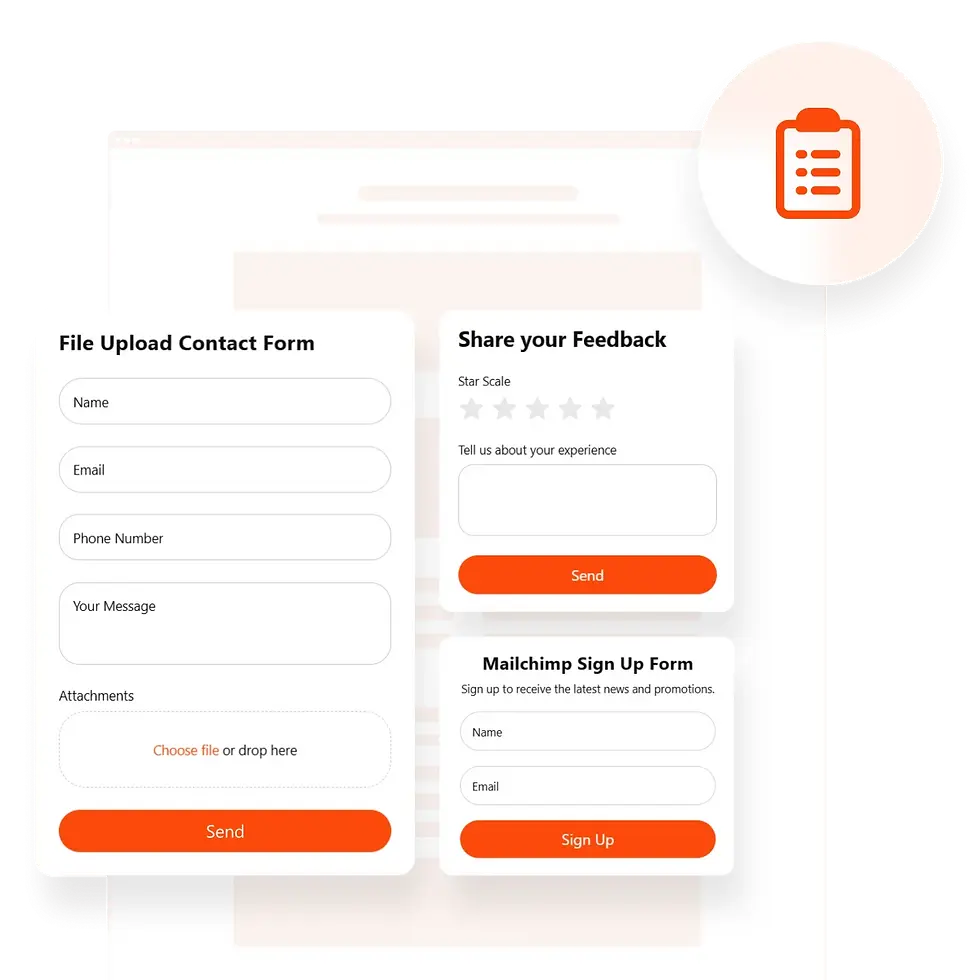
Connecting Forms, Booking Systems, Payment Processing, and Other Tools
Web developers implement the features that allow visitors to interact with a business and complete important actions online.
This may include contact forms, appointment scheduling, customer registration, online payments, product filtering, and e-commerce checkout functionality.
Consider a small e-commerce business selling products across Canada. Its website needs to display products, manage inventory, calculate shipping, accept payments, and send order confirmations.
The developer configures the systems that make these processes work together.
For service-based businesses, the requirements may be simpler but just as important. A contact form should collect the right information, deliver submissions to the correct inbox or CRM, and provide a clear confirmation to the visitor.
A form that looks perfect but sends every inquiry into the digital equivalent of a black hole is not doing its job.
Testing Functionality, Compatibility, Performance, and Security
Building a website is only part of the development process. Developers also need to test it to identify issues before and after launch.
This includes checking whether links work, forms submit correctly, interactive elements behave as expected, and pages display properly across different browsers and devices.
Performance is another important consideration. Developers may optimize images, reduce unnecessary scripts, improve code efficiency, and configure caching to help pages load more efficiently.
Security also matters, particularly for websites that collect personal information, process payments, or manage customer accounts. Depending on the project, this may involve secure connections, software updates, access controls, input validation, and other protective measures.
Testing helps identify problems before they affect visitors, customers, or business operations.
Maintaining and Improving the Website After Launch
A website isn't necessarily finished the day it goes live. It needs ongoing maintenance to remain secure, functional, and aligned with changing business requirements.
Developers may update software, fix bugs, improve page performance, troubleshoot integrations, and implement new features as the business grows.
For example, a company might initially launch with a basic service website before adding online booking, a customer portal, or e-commerce functionality several months later.
Ongoing development allows the website to evolve alongside the business rather than becoming outdated as its needs change.
This is one reason website ownership should include a plan for maintenance, updates, and technical support.

What Is the Difference Between Front-End and Back-End Development?
Web development is generally divided into two main areas: front-end development and back-end development. Each focuses on a different part of how a website operates.
Front-end development deals with the parts of a website visitors see and interact with. Back-end development handles the behind-the-scenes systems that process information and support website functionality.
Some developers specialize in one area, while others work across both.
Understanding these roles also helps clarify the web design vs web development differences. Although front-end developers work closely with visual design, their responsibilities are primarily technical.
Front-End Development
Front-end development focuses on building the parts of a website that visitors see and interact with.
A front-end developer takes website designs and implements them using technologies such as HTML, CSS, and JavaScript. They make sure layouts display correctly, buttons respond to clicks, navigation works, and interactive features behave as intended.
For example, on an e-commerce website, the front end includes the product images, descriptions, navigation menu, product filters, shopping cart interface, and checkout screens.
Front-end developers also consider responsive layouts, accessibility, browser compatibility, and performance.
Their work sits at the intersection of design and technology, but it is not the same as web design. A designer decides how the interface should look and feel, while a front-end developer builds the code that makes that interface function.
Front-End Developer vs. Web Designer: What's the Difference?
The front end developer vs web designer distinction can be confusing because both professionals work on the visible parts of a website.
A web designer focuses on the visual presentation, layout, branding, and user experience. A front-end developer focuses on implementing those decisions through code and making the interface interactive and responsive.
For example, a designer may create a navigation menu with dropdown options and a mobile layout. The front-end developer implements the menu, writes the necessary code, and tests its behaviour across different devices.
This also explains the front end web developer vs web designer distinction: one plans the interface and the other builds its technical implementation.
When comparing the difference between front end developer and web designer, remember that the designer is primarily concerned with the intended experience, while the developer is responsible for making that experience work in the browser.
In smaller projects, one person may handle both responsibilities. However, the skills and objectives remain different.
Back-End Development
Back-end development focuses on the systems and processes that operate behind the scenes.
Visitors generally don't see the back end directly, but it plays an important role in making websites function.
Back-end developers work with server-side programming, databases, APIs, authentication, and business logic. They build systems that receive information, process requests, retrieve data, and communicate with other services.
For example, when a customer purchases a product online, the back end may process the order, verify payment information through a payment provider, update inventory, and store the transaction details.
A booking website may use back-end functionality to check appointment availability, save reservations, and send confirmation notifications.
Without the back end, many of the features businesses rely on would have no way to process information or complete their intended tasks.
Full-Stack Development
Full-stack development combines front-end and back-end development.
A full-stack developer has the skills to work on both the visible interface and the underlying systems that support website functionality.
This may involve building page layouts, implementing interactive features, developing server-side logic, managing databases, and connecting APIs.
For example, a full-stack developer building a custom booking platform might create the customer-facing booking interface, develop the system that checks available appointments, connect the database, and implement automated confirmation emails.
Full-stack developers can be particularly valuable for projects that require coordination across multiple technical areas.
However, full-stack doesn't necessarily mean expert-level specialization in every technology. The depth of a developer's experience can vary depending on their background and the complexity of the project.
Frontend Developer vs. Web Developer: What's the Difference?
When comparing a frontend developer vs web developer, it's important to understand that front-end development is one specialization within the broader field of web development.
A front-end developer specializes in the client-facing portion of a website or web application. A web developer is a broader term that can refer to front-end developers, back-end developers, or full-stack developers who work across both areas.
In other words, all front-end developers are web developers, but not all web developers specialize in front-end development.
This distinction is useful when hiring for a project. If your business needs improvements to its website interface, you may need front-end development. If you need a custom database, payment processing system, or complex integrations, back-end expertise may also be required.

What Programming Languages and Tools Do Web Developers Use?
Web developers use different programming languages, frameworks, platforms, and software tools depending on the website they're building.
Some technologies control how website content is structured and displayed, while others manage interactive behaviour, server-side processes, and data storage.
You don't need to learn how to code to manage a business website, but understanding the basic technologies can help you make more informed decisions when choosing a website professional or platform.
HTML: Structuring Website Content
HTML (HyperText Markup Language) provides the structure of a web page.
It defines elements such as headings, paragraphs, images, links, forms, and other content components.
For example, HTML tells a browser which text is a main heading, which section contains a paragraph, and where an image should appear.
Think of HTML as the structural framework of a website. It establishes the content and organization that other technologies build upon.
CSS: Controlling Website Appearance
CSS (Cascading Style Sheets) controls how HTML elements are presented.
Developers use CSS to manage colours, typography, spacing, layouts, borders, animations, and responsive behaviour.
For example, CSS can determine whether a website uses a two-column layout on desktop, switches to a single column on mobile, or displays buttons with specific colours and dimensions.
While web designers establish the visual direction, CSS is one of the main technologies developers use to implement that direction in a coded website.
JavaScript: Adding Interactivity
JavaScript is a programming language used to add interactive behaviour to websites.
It can power features such as dropdown menus, dynamic forms, interactive maps, product filters, calculators, and other browser-based functionality.
For example, when a customer selects a product size and the displayed price or available options change automatically, JavaScript may be involved in making that interaction possible.
JavaScript is widely used in modern front-end development and can also support back-end applications through environments such as Node.js.
PHP and Python: Supporting Back-End Functionality
PHP and Python are programming languages commonly used for back-end development.
PHP is widely associated with WordPress and can be used to manage website functionality, process information, and interact with databases.
Python is used for a wide range of applications, including web development, data processing, automation, and software integrations.
The language selected depends on the project's technical requirements, existing systems, and development environment.
Databases and APIs: Connecting Website Systems
Databases store and organize information that websites and applications need to access.
This may include customer accounts, product details, orders, appointments, and other business information.
APIs allow different software systems to communicate with one another. They can help connect a website to payment providers, CRM platforms, email marketing software, booking systems, and other third-party tools.
For businesses, these technologies can reduce manual work and create more connected operations.
For example, a website inquiry could automatically enter a CRM, trigger an email notification, and start a follow-up workflow without someone manually copying information between platforms.
Web Development vs. Web Design: Which Is Better?
A common question business owners ask is web development or web design which is better. The answer depends on what your website needs.
Neither discipline is inherently better because they solve different problems. Web design focuses on the visual experience, usability, and how effectively a website communicates your brand. Web development focuses on functionality, technical performance, and the systems that make the website work.
If your website looks outdated, has confusing navigation, or doesn't communicate your services effectively, investing in web design may be the right starting point.
If your website has broken features, complicated integrations, unreliable forms, or requires custom functionality, web development may be the priority.
Most businesses need a combination of both. A new website, for example, requires a thoughtful design and the technical work to bring it to life.
When considering coding vs web design, remember that coding is one way to implement a website, not a replacement for good design. Likewise, a well-designed mockup isn't a substitute for a functional website.
The best approach is to differentiate between web designer and web developer based on the work your project requires, rather than assuming one role can automatically replace the other.
Ultimately, the goal isn't to choose between design and development. It's to build a website that looks professional, works reliably, supports your customers, and helps your business grow.
How Do Web Design and Web Development Work Together?
Web design and web development are two parts of the same process. One focuses on creating the website experience, while the other brings that experience to life through code, functionality, and technical integrations.
A website needs both to work effectively. A visually impressive design won't accomplish much if visitors can't navigate it, complete a purchase, or submit an inquiry. Likewise, a technically sound website may struggle to engage visitors if its layout is confusing or its design doesn't build trust.
Understanding the web developer vs designer relationship helps explain why these roles work best together. A designer plans how the website should look and feel, while a developer makes sure those designs function as intended.
So, what is difference between web designing and web development? The distinction comes down to how each role contributes to the same goal: building a website that looks professional, works properly, and supports the business behind it.

Define the Website's Goals and Requirements
Before anyone starts designing or developing, the first step is understanding what the website needs to accomplish.
A business website might be designed to generate leads, sell products, accept bookings, showcase services, or provide information. These goals influence everything that follows, from the pages that need to be created to the features that need to be developed.
The designer considers how visitors should experience the website and what information they need to make decisions. The developer considers the technical requirements needed to support those goals, including integrations, forms, payment systems, and other functionality.
When both roles understand the requirements from the beginning, the project has a clearer direction. It also reduces the risk of designing something that is difficult to build or developing features that don't actually support the business.
Plan the Structure and User Journey
Once the goals are established, the next step is planning the website's structure and how visitors will move through it.
This involves organizing pages, establishing navigation, identifying important information, and mapping out the actions visitors should take. For example, someone visiting a service page might move to a case study, review the company's offerings, and eventually submit a contact form.
This is where website structure connects with the customer journey. Each page should have a purpose and help visitors move closer to a decision without making them work harder than necessary.
A designer helps plan the visual hierarchy and user experience, while a developer considers how the structure will be implemented and how different pages and features will connect.
Understanding how people move from discovering a business to becoming a customer can make this process much more effective. Our Beginner's Guide to the Customer Funnel explains how different stages of the customer journey influence your marketing and website strategy.

Design the Website Experience
With the website's goals and structure established, the designer can begin creating the visual experience.
This includes developing page layouts, selecting typography and colours, incorporating imagery, designing navigation, and positioning calls to action. The objective is to create a consistent experience that reflects the brand while making it easy for visitors to find what they need.
The developer may be involved during this stage to identify technical considerations and ensure the proposed designs can be implemented effectively. This collaboration helps avoid unnecessary revisions later in the project.
The difference between web development and design becomes particularly clear here. Web design establishes the intended appearance and experience, while web development determines how that experience is built and functions.
Your website's appearance should also reflect your brand, audience, and industry. If you're still deciding on a direction, explore our guide on How to Choose Your Web Design Look for help selecting a visual style that fits your business.
Develop and Integrate the Website
Once the designs are approved, development turns the planned experience into a working website.
The developer builds the pages, implements the layouts, adds interactive elements, and configures the functionality required to support the website's goals.
Depending on the project, this may include contact forms, booking systems, e-commerce features, payment processing, customer relationship management (CRM) integrations, and marketing automation.
This is where website design vs development becomes a practical distinction. The design provides the visual and structural direction, while development makes that direction functional across devices and browsers.
Designers and developers may continue working together throughout this stage. Some design decisions may need adjustments to accommodate technical requirements, while development feedback can help improve usability and performance.
The goal isn't simply to make the website look like the original design. It's to create a reliable, functional experience that delivers what visitors and the business need.
Test, Launch, and Improve
A website isn't ready just because it looks finished. Before launch, the design and development teams need to test the experience to make sure everything works as expected.
This includes checking navigation, links, forms, buttons, mobile responsiveness, browser compatibility, loading performance, and any third-party integrations. E-commerce websites also need their checkout and payment processes tested carefully.
The design should be reviewed for consistency, readability, and usability, while the development team checks functionality, technical performance, and security considerations.
After testing and final adjustments, the website can be launched. However, the work shouldn't necessarily stop there.
Visitor behaviour, website analytics, search performance, and customer feedback can reveal opportunities to improve the experience over time. New pages, updated content, improved calls to action, and additional integrations can help the website continue supporting the business as it grows.
The best websites are built through collaboration, not isolation. When web design and web development work together from the planning stage through launch and beyond, the result is more than an attractive website. It's a functional business tool designed to support real goals.
Why Do Businesses Need Both Web Design and Web Development?
A successful business website needs more than an attractive appearance or reliable technical functionality. It needs both.
Web design creates an experience that helps visitors understand your business, build trust, and take action. Web development makes that experience work through responsive layouts, interactive features, integrations, and reliable functionality.
Understanding what is the difference between web design and development helps businesses see why neither should be treated as an afterthought.
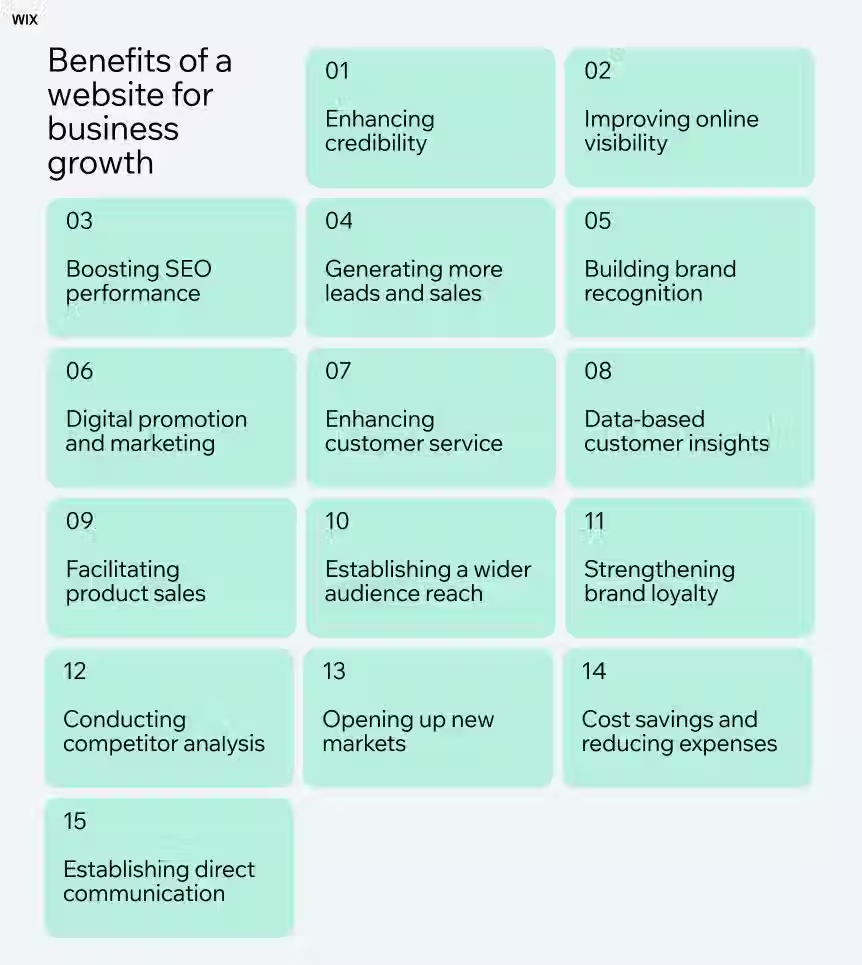
The web design vs web development difference isn't about choosing one over the other. It's about understanding how two complementary disciplines contribute to a website that supports business growth.
Good Web Design Supports Business Growth
Your website often creates a visitor's first impression of your business. Before someone calls, books an appointment, or requests a quote, they may visit your website to decide whether your company is worth considering.
Good web design helps make that decision easier.
A clear layout, consistent branding, readable content, intuitive navigation, and strategically placed calls to action help visitors understand what you offer and where to go next. When information is easy to find, people spend less time figuring out your website and more time considering your products or services.
Professional design also helps establish credibility. An outdated, cluttered, or inconsistent website can make a business appear less trustworthy, even if the products and services behind it are excellent.
More importantly, effective web design considers the actions you want visitors to take. Whether that's submitting a contact form, making a purchase, booking a consultation, or calling your business, every page should help move visitors toward a meaningful next step.
A well-designed website isn't just there to look good. It's there to make your business easier to understand, trust, and choose.
Good Web Development Supports Business Growth
While web design shapes the visitor experience, web development makes sure the website can deliver it.
Good web development creates a reliable technical foundation that allows your website to function across devices, browsers, and different user interactions. Pages should load properly, forms should submit, navigation should work, and important features should perform as expected.
Development also allows businesses to connect their websites with the tools they rely on. This can include payment processors, booking platforms, customer relationship management (CRM) systems, email marketing software, analytics tools, and marketing automation.
These integrations can reduce manual work, improve the customer experience, and help businesses manage more of their operations from one connected system.
Technical development also supports website performance, accessibility, security, and search engine optimization. A properly developed website gives search engines a clearer technical foundation to crawl and understand, while helping visitors access content without unnecessary friction.
However, a website doesn't generate traffic simply because it has been developed well. Businesses still need a strategy to attract the right audience.
Our guide to Top Marketing Channels to Grow Your Website Traffic explores different ways to bring visitors to your website and turn online visibility into business opportunities.
What Happens When One Is Neglected?
When businesses focus on only one side of the process, the website can struggle to deliver its full potential.
A website with excellent design but poor development might look impressive in a presentation but fail when visitors try to use it. Slow loading pages, broken forms, confusing interactions, and unreliable integrations can quickly damage the experience.
On the other hand, a technically functional website with poor design can make it difficult for visitors to understand the business, find important information, or feel confident enough to take action.
This is why understanding the what is difference between web design and development question matters beyond terminology. Both disciplines solve different problems, but those problems are connected.
A business needs a website that attracts attention, communicates value, functions reliably, and supports its goals. Neglecting either design or development creates gaps that can affect the entire customer experience.
The bottom line: Good design gives people a reason to engage with your website.
Good development gives them a reliable way to do it. Together, they create a stronger online foundation for your business.

How Much Do Web Design and Web Development Cost?
The cost of building a website depends on more than how many pages it has. The design complexity, required functionality, integrations, content, and level of customization all influence the final investment.
As a general estimate, web design costs can range from $500 to $20,000, while web development costs can range from $2,000 to $50,000.
These are broad project ranges, not fixed prices.
A straightforward small business website will typically require a different budget than a custom e-commerce platform or a complex website with specialized functionality.
So, what is the difference between web developer and web designer when it comes to pricing? A web designer typically charges for planning and creating the website's visual experience, while a web developer charges for building, programming, and implementing its functionality.
Depending on the project, one professional or agency may handle both responsibilities as part of a combined package.
Understanding web design vs web development cost can help you plan your budget and identify where your investment is going.
For a more detailed breakdown of website pricing in the Canadian market, read our guide to the Average Cost of a Website in Canada.
What Influences Web Design Costs?
Web design costs are primarily influenced by the amount of planning, creativity, and customization required to create the website's visual experience.
A simple website using an established template will generally cost less than a fully custom design developed around a business's brand, audience, and specific goals.
The difference of web design and web development is important here: design costs focus on how the website looks and how visitors experience it, rather than the technical work required to make its features function.
Several factors can influence the price of web design.
Number of Pages and Layouts
A five-page website with a consistent layout will generally require less design work than a website with dozens of unique pages, landing pages, and specialized layouts.
Custom Design and Branding
Custom typography, colour systems, graphics, illustrations, animations, and brand-specific visual elements can increase the amount of design time required. Existing brand guidelines and assets may help streamline this process.
User Experience (UX) and User Interface (UI)
Websites that require detailed user journey planning, custom navigation, interactive prototypes, or complex page layouts often involve additional research and design work.
Responsive and Mobile Design
A website needs to provide a consistent experience across desktops, tablets, and mobile devices. More complex layouts and interactions may require additional design and testing.
Content and Imagery
Professional photography, custom graphics, iconography, illustrations, and content layout can all affect the design budget. If these assets need to be created specifically for the website, they may add to the overall cost.
Revisions and Design Complexity
The number of design concepts, feedback rounds, and revisions can influence project timelines and pricing. A clearly defined scope helps keep expectations and costs aligned.
Ultimately, good web design isn't just about making a website look attractive. It's about creating an experience that builds trust, communicates value, and helps visitors take the next step.
What Influences Web Development Costs?
Web development costs are influenced by the technical requirements involved in building, configuring, and maintaining a website.
A standard business website with a contact form and a few service pages is generally less complex to develop than an online store with payment processing, customer accounts, inventory management, and multiple integrations.
The more specialized functionality a website needs, the more development time and technical expertise may be required.
Website Functionality
Features such as booking systems, search filters, customer portals, interactive tools, user accounts, and custom forms add development work beyond basic page creation.
E-Commerce and Payment Integration
Online stores often require product catalogues, shopping carts, checkout processes, payment gateways, shipping configurations, tax settings, and inventory management. These requirements can significantly increase development costs.
Custom Coding and Development
Websites built with custom functionality or specialized technical requirements may need more programming than websites built using existing themes, templates, or platform features.
Third-Party Integrations
Connecting a website to CRM platforms, email marketing software, scheduling tools, accounting systems, or other business applications can add development and configuration work. The complexity depends on the platforms involved and how information needs to move between them.
Content Management System (CMS)
The selected platform can influence development time, flexibility, and ongoing maintenance. WordPress, Shopify, Wix Studio, and Squarespace each offer different features and customization options.
Performance, Security, and Technical Requirements
Website speed optimization, security configurations, database management, accessibility considerations, backups, and technical testing can all contribute to development costs.
Ongoing Maintenance and Support
A website may require software updates, troubleshooting, hosting management, security monitoring, and future improvements after launch. These services may be included in a maintenance plan or billed separately.
The key is to build around what your business actually needs. Adding every possible feature can make a website more expensive without necessarily making it more effective.
A well-planned website balances design, functionality, and budget. It should give your customers a smooth experience while providing your business with a reliable foundation to grow.

Should You Hire a Web Designer, a Web Developer, or a Web Design Agency?
Choosing who should build your website depends on your business goals, budget, technical requirements, and how much time you're willing to invest.
Some businesses can get started with a DIY website builder. Others benefit from an AI-powered platform or an experienced freelancer. Businesses with more complex requirements may need a professional agency or custom development team.
Before making a decision, it's worth understanding what is difference between web designer and web developer. A web designer focuses on the website's visual appearance, layout, and user experience. A web developer focuses on the technical side, including functionality, integrations, and performance.
If you're asking, do I need a web designer or web developer, the answer depends on what you're trying to accomplish.
If you need help with how your website looks and feels, a designer may be the right starting point.
If you need custom functionality or technical improvements, a developer may be more suitable.
If you need both, you may benefit from a team that can manage the entire project.
Here are five common options and the types of businesses each one supports.
DIY Website Builders
DIY website builders allow business owners to create and manage their own websites using pre-designed templates, visual editors, and built-in features.
Platforms such as Wix, Squarespace, and Shopify make it possible to launch a website without hiring a designer or developer.
Pros
DIY platforms are generally affordable, beginner-friendly, and relatively quick to set up.
They offer templates, hosting options, and built-in tools that make managing a basic website easier.
Cons
Customization can be limited, and the quality of the finished website depends heavily on the owner's design skills and attention to detail.
More advanced functionality, integrations, and technical SEO improvements may require additional tools or professional assistance.
Best for
Home-based businesses, solo entrepreneurs, freelancers, early-stage startups, and businesses that need a simple online presence without a large upfront investment.
If you're just getting started and need a website to showcase your services, provide contact information, and establish credibility, a DIY platform can be a practical first step.
You can always invest in a more customized website as your business grows.
AI Website Builders and AI-Powered Platforms
AI website builders use artificial intelligence to help generate website layouts, content, images, and page structures.
Instead of starting with a blank template, you can often describe your business and let the platform create an initial website.
Pros
AI tools can speed up the initial setup, help generate content ideas, and make website creation more approachable for beginners.
They can also provide a useful starting point when you aren't sure how to structure your pages.
Cons
AI-generated websites can feel generic, produce inaccurate or repetitive content, and require considerable editing.
You still need to review the design, messaging, functionality, accessibility, and SEO.
AI can help build a website, but it doesn't automatically understand your customers or business strategy.
Best for
Entrepreneurs testing a business idea, side projects, individuals with limited budgets, and small businesses that need a basic website quickly.
AI platforms are useful tools, but they shouldn't replace business judgment. A website still needs a clear purpose, thoughtful content, and an experience that gives visitors a reason to trust your business.
Freelance Web Designers and Developers
Hiring a freelancer gives you access to an individual specialist without the cost or commitment of bringing someone onto your internal team.
A freelance web designer can help with branding, page layouts, visual consistency, and user experience.
A freelance web developer can handle coding, custom functionality, integrations, and technical improvements.
Pros
Freelancers can offer more personalized attention, flexible working arrangements, and specialized expertise.
Depending on the scope, hiring one freelancer can also be more affordable than working with a full-service agency.
Cons
One freelancer may not have every skill required to complete the project.
You may need to hire separate professionals for design, development, copywriting, SEO, and other services.
Availability, project management, communication, and ongoing support can also vary.
Best for
Small and growing businesses with a defined project, companies that already have some internal marketing or technical support, and business owners who know exactly what services they need.
Freelancers can be an excellent option when your requirements are clear.
However, if you need someone to manage the entire website design and development process, make sure you understand who is responsible for each stage and how the different pieces will work together.
Web Design and Development Agencies
A web design and development agency brings multiple skills together to plan, design, build, and launch a website.
Depending on the agency, its team may include designers, developers, SEO specialists, content creators, and digital marketing professionals.
Pros
Agencies can manage larger projects, combine different areas of expertise, and provide a more coordinated approach.
Instead of finding and managing several independent specialists, you have one team responsible for bringing the project together.
Cons
Agency services generally require a larger investment than DIY platforms and may be more expensive than hiring an individual freelancer.
Some agencies also have longer timelines or standardized processes that may not suit every project.
Not every agency offers the same level of technical expertise or ongoing support.
Best for
Established small and medium-sized businesses, growing companies, e-commerce businesses, and organizations that need a professional website connected to broader marketing goals.
An agency can be particularly valuable when your website needs to do more than look professional.
If you need SEO, advertising, automation, lead generation, and integrated systems working together, having a coordinated team can make the process much easier to manage.
Custom Website Development
Custom website development involves building a website or web application around specific business requirements rather than relying primarily on an off-the-shelf template or standard platform features.
This approach may involve custom programming, databases, APIs, specialized integrations, and unique functionality.
Pros
Custom development offers greater flexibility and control over how the website works.
It can support specialized business processes, complex integrations, unique user experiences, and functionality that standard website builders cannot easily provide.
Cons
Custom development typically requires a larger budget, more planning, and a longer development timeline.
It may also require ongoing technical support and maintenance from qualified developers.
Best for
Larger organizations, technology companies, SaaS businesses, complex e-commerce operations, and companies with specialized functionality or integration requirements.
Custom development isn't automatically better than using an established website platform.
For many small businesses, a well-planned WordPress, Shopify, Wix Studio, or Squarespace website can meet their needs without the added cost and complexity of building everything from scratch.
What Should You Look for Before Hiring?
Once you've decided to hire a professional, the next challenge is finding someone who can deliver the right results.
Understanding the web design vs web development differences helps you evaluate what a potential provider actually offers. Some professionals specialize in visual design, while others focus on technical development. A full-service provider should be able to explain how both areas fit into the project.
Here are several things to consider before signing an agreement.
Review their portfolio and previous work.
Look beyond attractive screenshots. Visit the actual websites they've built and check how they perform on mobile devices, how easy they are to navigate, and whether they communicate the business's services clearly.
Understand what's included.
Ask whether the project includes design, development, responsive layouts, basic SEO setup, content support, integrations, testing, and launch assistance. A low initial quote may not include everything you need.
Ask about their process.
A professional provider should be able to explain their website design and development process, including discovery, planning, design, development, testing, and launch. You should know what happens at each stage and what they'll need from you.
Check their technical experience.
Make sure they understand the platform and functionality your business requires. If you need e-commerce, booking systems, payment processing, CRM integrations, or marketing automation, ask for examples of similar work.
Discuss ownership and access.
Your business should retain appropriate ownership and administrative access to its domain, website, hosting, and connected accounts. Clarify who owns the website files, design assets, content, and any custom code.
Ask about SEO and performance.
A professional website should be built with search visibility, mobile usability, accessibility, and performance in mind. Ask what technical SEO foundations are included and whether ongoing SEO services are available separately.
Understand ongoing support.
Websites need updates, maintenance, security monitoring, and occasional improvements. Find out whether support is included, offered through a maintenance plan, or handled separately.
Look for communication and transparency.
You should understand the project timeline, pricing, responsibilities, revision process, and what happens if requirements change. A good working relationship is just as important as technical ability.
Ultimately, the right web design and web development agency should understand more than how to build a website. It should understand what your business is trying to achieve and how the website can support those goals.
Conclusion
Understanding what is the difference between web design and web development makes it easier to see why both are essential to building a successful business website.
Web design shapes how your website looks, feels, and guides visitors. Web development brings that experience to life through functionality, integrations, and the technical foundation that keeps everything working.
So, what is web design vs web development?
Think of web design as the blueprint for the experience and web development as the process of turning that blueprint into a working website.
Neither replaces the other. They work together to create a website that looks professional, provides a great user experience, and supports your business goals.
And when it comes to web development or web design which is better, the answer depends on what your project needs. If you're planning a new website, you'll benefit from both.
Strong design without reliable development can leave visitors frustrated, while solid development without thoughtful design can make your website difficult to use or connect with.
Ultimately, website design and website development should be treated as two connected parts of the same investment. Your website needs to attract the right audience, communicate your value, make it easy to take action, and give your business room to grow.
If you're ready to build or improve your online presence, start with our guides on How to Build a Website for a Business and Essential Pages for Business Websites. They'll help you understand what goes into creating a website that works for your business, not just one that looks good on launch day.
Frequently Asked Questions (FAQ)
Which is better, web design or web development?
Neither web design nor web development is better because they serve different purposes. Web design focuses on a website's appearance, layout, branding, and user experience, while web development focuses on its functionality, coding, and technical performance. For most business websites, both are important. The right choice depends on whether your priority is improving the visual experience, adding functionality, or building a complete website.
Who gets paid more, a web designer or a developer?
Web developers generally have higher earning potential than web designers, particularly those with specialized skills in back-end development, full-stack development, software architecture, and complex integrations. However, salaries vary based on experience, location, technical skills, industry, and employment type. Senior UX/UI designers and specialized digital designers can also earn competitive salaries.
Is a web designer in demand?
Yes, web designers remain in demand as businesses continue investing in their websites, e-commerce experiences, and digital presence. Companies need websites that are visually appealing, mobile-friendly, accessible, and easy to navigate. Demand also extends to designers with skills in user experience (UX), user interface (UI), responsive design, conversion optimization, and website platforms.
Can I learn web design in 3 months?
Yes, you can learn the fundamentals of web design in three months with consistent practice. You can develop a basic understanding of layout, typography, colour theory, visual hierarchy, responsive design, and user experience. You may also learn to create simple website designs using tools such as Figma or website builders.
However, becoming a professional web designer takes longer. Building a strong portfolio, understanding different industries, developing problem-solving skills, and gaining experience with real projects require continued learning and practice.
How long does it take to learn web design?
Learning basic web design can take a few weeks to three months, depending on your learning schedule and previous experience. Developing intermediate skills may take six months to a year, while becoming an experienced professional can take several years of practical work.
The timeline depends on what you want to achieve. Designing simple websites with a website builder requires a different skill set than creating detailed UX/UI designs, interactive prototypes, and complex user experiences.
Is AI replacing web designers?
AI is changing how web designers work, but it is not replacing the need for skilled designers. AI tools can help generate layouts, suggest colour palettes, create design variations, and speed up repetitive tasks. However, they still require human direction to understand business goals, brand identity, customer behaviour, accessibility, and user experience.
The role of a web designer is evolving toward strategy, creative direction, problem-solving, and improving the overall digital experience. Designers who learn to use AI effectively can work more efficiently while focusing on the decisions that require human judgment.
Does web design include coding?
Web design does not always require coding. Many designers use visual design tools such as Figma or website builders such as WordPress, Wix Studio, Squarespace, and Shopify to create website layouts and experiences without writing code.
However, knowledge of HTML, CSS, and JavaScript can be beneficial, especially when working on custom designs or collaborating with developers. Coding becomes more important when a project requires advanced functionality, custom interactions, or technical development.
What is the difference between web design and web development?
Web design focuses on how a website looks and how visitors interact with it. This includes page layouts, colours, typography, navigation, branding, and user experience.
Web development focuses on building the website and making its features work. This includes coding, responsive functionality, databases, integrations, forms, and technical performance.
In simple terms, web design plans the website experience, while web development turns that experience into a functioning website. Both disciplines work together to create an effective online presence.
Do I need a web designer or a web developer for my small business?
Most small businesses benefit from both web design and web development, but the level of expertise you need depends on the project.
If you already have a functioning website but want to improve its appearance, branding, layout, or user experience, a web designer may be the right starting point. If you need custom functionality, integrations, booking systems, payment processing, or technical improvements, you may need a web developer.
If you're starting from scratch, consider working with a professional or agency that can manage both sides of the project. This helps ensure your website looks professional, functions properly, and supports your business goals without having to coordinate multiple specialists yourself.
Can one person handle both web design and web development?
Yes, one person can handle both web design and web development, particularly for smaller projects and websites built using platforms such as WordPress, Wix Studio, Squarespace, or Shopify.
These professionals are sometimes called full-stack designers or designer-developers, depending on their skill set. They may be able to plan the layout, create the visual design, build the website, and configure its functionality.
However, more complex projects may require separate specialists. Custom applications, advanced integrations, large e-commerce websites, and specialized user experiences often benefit from dedicated design and development expertise.
Should I use a website builder or hire a web developer?
A website builder is often a practical choice for small businesses that need a straightforward website with standard features and have the time to manage the setup themselves. Platforms such as WordPress, Wix Studio, Squarespace, and Shopify offer tools for building and managing websites without extensive programming knowledge.
Hiring a web developer may be the better option if your website requires custom functionality, complex integrations, advanced e-commerce features, or technical solutions beyond what a standard website builder can provide.
You can also hire a professional to build your website using a website builder. This gives you the benefit of professional design and setup while allowing you to manage everyday content updates yourself.
The best option depends on your budget, technical requirements, available time, and long-term business goals.
How do web design, SEO, and website performance work together?
Web design, search engine optimization (SEO), and website performance work together to create a website that is easy to find, use, and navigate.
Web design improves the visual experience, content structure, navigation, and usability. SEO helps search engines understand your website and connect its content with relevant searches. Website performance focuses on technical factors such as loading speed, mobile responsiveness, stability, and accessibility.
These areas influence one another. A well-organized design can make content easier to navigate, a technically sound website can support search engine crawling, and fast-loading pages can provide a better user experience.
For a business website to perform well, all three should be considered from the beginning rather than treated as separate projects after launch.


Comments